
Top 5 Reclaim AI Alternatives for Flexible Scheduling
Reclaim AI is great at protecting focus time. Less great when your capacity changes hour to hour. Here's what works instead.

Reclaim AI is a genuinely good tool, and that’s worth saying clearly before getting to alternatives. Its habit scheduling is one of the better implementations in the AI calendar space — when you tell Reclaim you want a daily exercise block or a noon lunch window, it defends those commitments automatically, moving them around meetings rather than simply letting them disappear. The focus time protection works. The Google Calendar integration is clean.
So why do people look for alternatives? Mostly because Reclaim’s model has a ceiling. It protects time based on rules you’ve set in advance — and applies those rules consistently. What it can’t do is adapt to how you actually feel on a given day. It also requires Google Calendar, which rules it out for anyone on Outlook or iCloud.
What to look for in a Reclaim AI alternative
Flexibility to fluctuating capacity. If your capacity changes day to day, you want a tool that can respond to that variability rather than executing a pre-set schedule regardless of circumstances.
Calendar compatibility. Reclaim is Google Calendar only. If you use Outlook, iCloud, or a combination, you need a tool that supports your actual setup.
Energy or context awareness. Tools that factor in physiological data produce schedules that are more likely to be executable, not just logically sound.
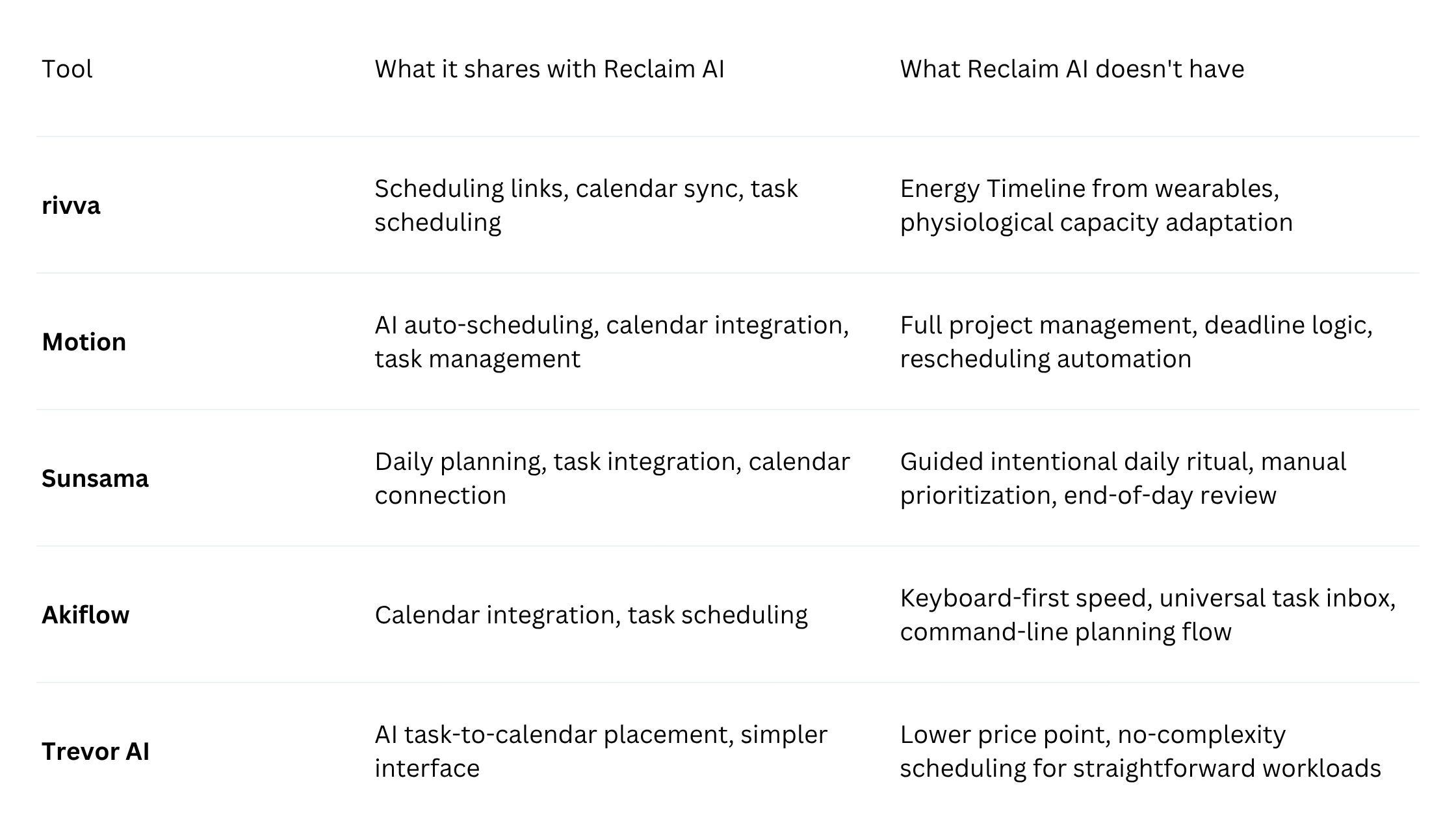
Quick comparison
Detailed tool breakdowns
1. rivva
Best for: People who want their schedule to adapt to their actual cognitive state — not just the rules they set up last week.
rivva reads your physiological state and builds your schedule around it. Connect your Apple Watch, Fitbit, Oura ring, or Whoop band, and rivva pulls sleep quality and recovery data overnight. From that data, it builds an Energy Timeline: a daily map of where your cognitive peaks and dips are likely to fall. Nia, rivva’s AI assistant (available by text and voice), then places your most demanding work into peak windows and lighter tasks into lower-capacity periods.
This addresses the specific gap in Reclaim’s model. Reclaim will schedule your focus time at 9am every day because that’s the rule you set. rivva will schedule your hardest task at 9am on the days when your sleep data says you’re cognitively prepared for it — and move it to a different window on days when it doesn’t.
rivva also includes Scheduling Links and syncs with Google Calendar, Outlook, and iCloud — addressing the calendar compatibility limitation that makes Reclaim a non-starter for non-Google users.
Key features:
Energy Timeline built from wearable sleep and recovery data
Nia AI assistant for text and voice scheduling
Smart Scheduling: hard tasks in cognitive peaks, lighter work in dips
Multi-calendar sync (Google, Outlook, iCloud)
Pricing: 7-day free trial, then $10/month or $80 per year.
Pros:
Energy-aware scheduling adapts to how you feel, not just what rules you set
Supports Google Calendar, Outlook, and iCloud — no platform lock-in
Voice interface with Nia reduces friction of checking in and updating your schedule
Cons:
No permanent free tier
Energy awareness is most precise when using a supported wearable
Newer tool compared to Reclaim
2. Motion
Best for: People who want AI to handle scheduling decisions almost entirely, particularly across multiple projects with competing deadlines.
Motion takes your full task list and automatically builds your schedule from scratch, factoring in deadlines, priorities, estimated durations, and calendar events. When something changes — a new meeting, a task that took longer than expected — Motion rearranges.
Pricing: Individual plans start around $19/month.
3. Sunsama
Best for: People who find pure automation unsatisfying and want a structured, intentional daily planning practice.
Sunsama guides you through a deliberate daily planning ritual: you review what’s on your plate, pull in tasks from integrations, decide what belongs today, estimate durations, and schedule those tasks. The contrast with Reclaim is about intentionality versus automation.
Pricing: Plans start around $16/month (billed annually).
4. Akiflow
Best for: People who want to bring tasks from everywhere into one place quickly and schedule them with keyboard-driven speed.
Akiflow’s core value is speed and consolidation. It pulls tasks from across your tools into a single universal inbox and lets you schedule tasks to time slots using keyboard shortcuts.
Pricing: Plans start around $15/month.
5. Trevor AI
Best for: People who want basic AI scheduling at a lower price point.
Trevor AI focuses on one thing: taking your task list and helping you place tasks into your calendar. Connect your task manager, surface unscheduled tasks, drag them onto your calendar or use AI to suggest where they should go.
Pricing: Free tier available. Pro plans around $4/month.
How to choose
If Reclaim fails on low-energy days → rivva is the direct solution: wearable data matches task demands to your actual cognitive state.
If you use Outlook or iCloud → Reclaim simply isn’t an option. rivva, Motion, Sunsama, and Akiflow all support non-Google calendars.
If scheduling decisions feel as exhausting as doing the work → Motion’s full auto-scheduling removes most of those decisions.
If you want more control and intentionality → Sunsama’s guided daily planning.
If the problem is capturing tasks from everywhere → Akiflow’s universal inbox.
If you want something simpler and cheaper → Trevor AI.
FAQ
Can rivva replace Reclaim AI entirely?
For most use cases, yes. rivva offers scheduling links, multi-calendar sync (including Google), task scheduling via Nia, and energy-aware planning from wearable data. The areas where Reclaim remains stronger are the free tier and the depth of existing task sync integrations.
Is Motion better than Reclaim for ADHD?
Motion addresses one ADHD-relevant problem well — it removes planning decisions by auto-scheduling everything. Where it falls short is capacity awareness: Motion schedules based on task logic, not how you actually feel. rivva addresses the energy variability and cognitive load matching issues more directly.
Bottom line
Reclaim AI is a well-designed tool that does specific things well: protecting habits, defending focus time, and working cleanly within Google Calendar. rivva addresses the energy and calendar flexibility gaps directly, using wearable data to build schedules that adapt to how you actually feel rather than assuming all days are equal.