
Things 3 for Android: The Best Alternatives in 2026
Things 3 is iOS-only. If you are on Android and want a premium task manager with the same clean design philosophy, here are the best alternatives available in 2026.

Things 3 from Cultured Code is one of the best-designed task managers available. It is also strictly iOS and macOS. There is no Android version, and there has never been one. Cultured Code has not announced plans to change this.
If you are on Android, or if you switch between Android and other platforms, you need an alternative. This post covers what makes Things 3 good, so you know what to look for, and the best alternatives available right now.
What Makes Things 3 Worth Replicating
Things 3 is not popular because it has the most features. It is popular because of how it feels to use. The design is calm, opinionated, and deliberately limited. A few things that make it stand out:
Natural language input. You type “email client proposal next Tuesday morning” and Things 3 parses the date, time, and task title without you filling out a form.
Today and Upcoming views. Things 3 has a clean separation between what you are doing today, what is coming up, and someday/maybe items. This is genuinely useful for managing cognitive load.
Areas and Projects. The organisational structure (Areas contain Projects, Projects contain Tasks) is intuitive for people who think in terms of life areas and active projects rather than flat lists.
Calm UI. No gamification. No streak counters. No overdue badges that turn red. Things 3 treats you like an adult who can manage their own priorities.
Good design. This is not a small thing. A tool you enjoy opening is one you actually use.
Why Things 3 Will Likely Never Come to Android
Cultured Code has been asked about Android many times. Their position has consistently been that building and maintaining a high-quality Android app is a significant engineering investment, and they prefer to stay focused on the Apple ecosystem.
This is a legitimate product decision. It also means if you are on Android, Things 3 is simply not available to you regardless of how much you want it.
The Best Things 3 Alternatives for Android in 2026
1. rivva (Best for energy-aware planning and ADHD users)
Best for: Knowledge workers, ADHD users, people whose energy varies through the day.
rivva takes the core Things 3 philosophy — calm interface, no shame mechanics, clear structure — and adds something Things 3 never had: AI-powered scheduling around your personal energy.
Where Things 3 helps you organise tasks, rivva also schedules them. It takes your task list and automatically places work into your day based on your energy level, your deadlines, and how long things take. You do not decide what to do next. rivva shows you.
Nia, rivva’s AI assistant, handles the things Things 3 leaves to you: breaking down big tasks, deciding what to do when you are overwhelmed, rebuilding your plan when the day goes sideways.
Why it appeals to Things 3 fans:
Clean, calm interface with no gamification or overdue shame mechanics
Calm dark UI that reduces visual noise
Clear Today/Upcoming structure with actual time blocks
Routines that auto-schedule repeating tasks
Works on iOS and Android, plus web and browser extension
What is different from Things 3: rivva is more opinionated about scheduling. It is not a pure GTD-style capture-and-organise tool. It is built around the question “what should I work on right now, given how I feel?” If you want total control over your own prioritisation without any AI input, Things 3 is closer to that model.
rivva is free to try. No credit card required.
Try rivva at rivva.app
2. TickTick (Most similar cross-platform feature set)
Best for: People who want the closest feature parity to Things 3 across both iOS and Android.
TickTick is the most direct functional equivalent to Things 3 that runs on Android. It has natural language input, a clean today view, projects and tags, and a built-in Pomodoro timer. The interface is more visually dense than Things 3 but is well-organised.
TickTick also has a calendar view that shows tasks as blocks alongside your events, which is a feature Things 3 lacks.
What to watch for: The free tier is limited. The premium tier adds most of the features that make it comparable to Things 3.
3. Todoist (Best for teams and integrations)
Best for: Anyone who needs their task manager to connect with project management tools, Slack, email clients, or team workflows.
Todoist is mature, available on every platform, and integrates with almost everything. Natural language input is strong. The Karma point system (gamification) can be turned off if you prefer a cleaner experience.
What to watch for: Todoist’s interface has become progressively more complex. If what you loved about Things 3 was its simplicity and calm, Todoist may feel busy.
4. Linear (Best if your work is software development)
Best for: Engineers and product teams working in sprints.
If the reason you used Things 3 was to manage work tasks alongside personal ones, and your work is primarily software development, Linear is worth considering for the work side. It is not a personal task manager, but it is beautifully designed in a way that will appeal to Things 3 users.
5. Notion (Best if you want everything in one place)
Best for: People who want tasks, notes, projects, and databases in the same tool.
Notion is not a dedicated task manager. It is a workspace. But with the right templates and setup, it can approximate the Things 3 structure (Areas, Projects, Tasks), and it runs everywhere including Android.
What to watch for: Setup time is significant. If Things 3’s appeal was that it worked great out of the box, Notion is the opposite.
TickTick vs Things 3: The Short Version
Since “ticktick vs things 3” is a common question:
Things 3 wins on: design, simplicity, natural language parsing, macOS integration, and the overall feel of using it.
TickTick wins on: cross-platform availability (including Android and Windows), built-in calendar view, Pomodoro timer, collaboration features, and a lower price point.
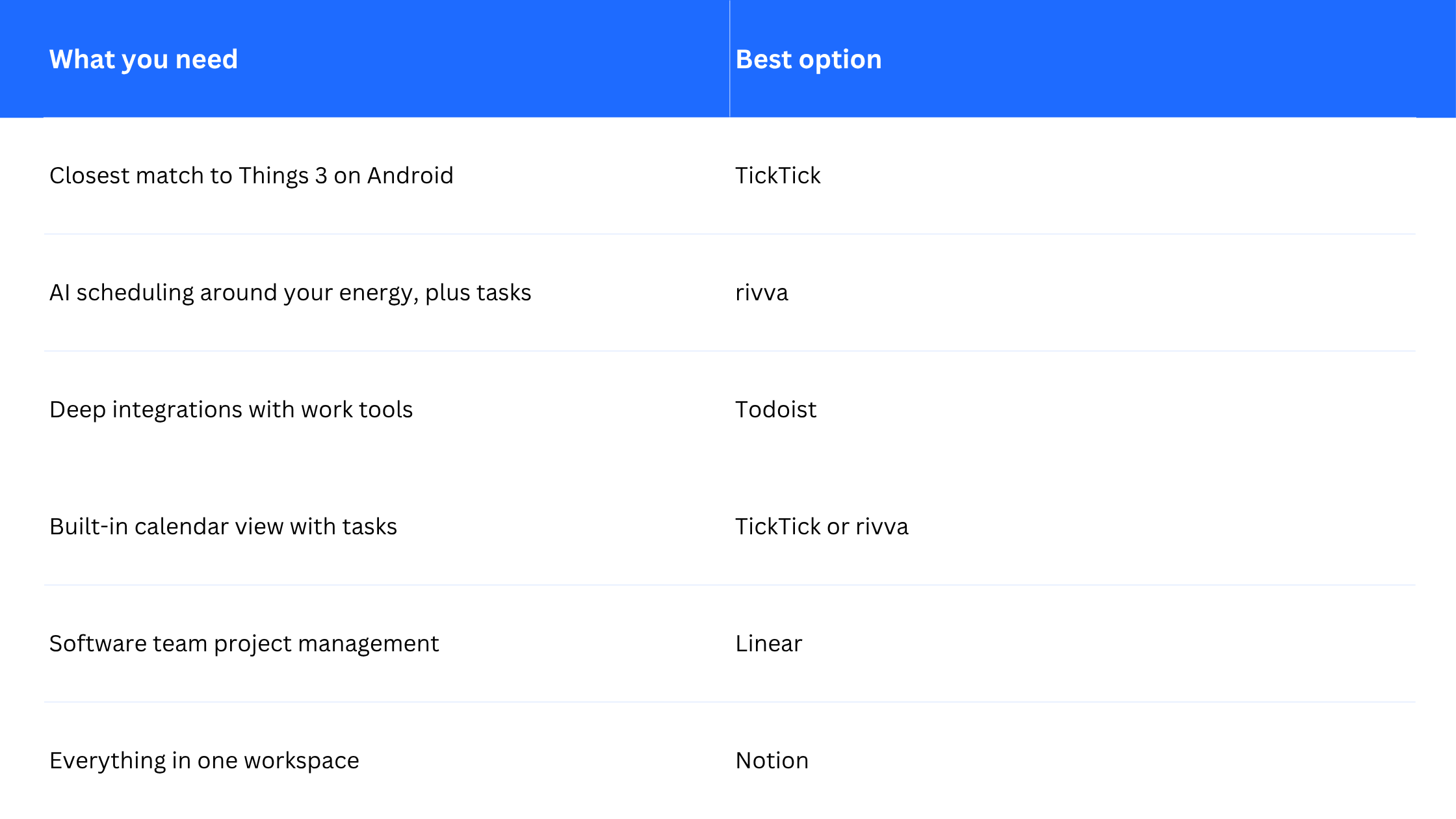
If you are on Android and switching from Things 3, TickTick is the most direct replacement. If you want something that goes further with AI scheduling and energy management, rivva is worth trying.
How to Choose
Frequently Asked Questions
Will Things 3 ever come to Android?
Cultured Code has not announced Android development. Based on their public statements over the years, it is not planned. If cross-platform access is important to you, it is worth assuming Things 3 will remain iOS and macOS only.
Is rivva available on Android?
Yes. rivva is available on iOS, Android, and web, and there is a browser extension for Chrome and Chromium browsers.
Is TickTick free?
TickTick has a functional free tier. The premium plan adds features like the calendar view, more projects, and better filtering.
Can rivva import from Things 3?
You cannot import directly from Things 3 into rivva currently. Most users manually add their active tasks during setup, which takes 10 minutes or less.
What if I use both iOS and Android?
rivva and TickTick both support mixed iOS/Android households. rivva syncs across all your devices and platforms. TickTick works similarly.
If Things 3 is not an option on Android, the question is whether you want a direct functional replacement or something that goes further. TickTick is the closest match. rivva is the better option if scheduling and energy management are as important as task organisation.
See how rivva compares to other task managers at rivva.app/compare