
Free Time Blocking Apps Worth Using in 2026
Free doesn't have to mean basic. These time blocking apps offer real scheduling intelligence, including one that adjusts your day when your energy shifts.

Most people searching for a free time blocking app are trying to solve the same problem: their calendar is full but their day still feels out of control. The issue is usually not the app — it’s that most time blocking tools treat every hour as equal. Your cognitive capacity fluctuates through the day based on sleep quality, meals, stress, and accumulated mental load.
What to look for in a free time blocking app
Calendar integration. If your life runs through Google Calendar, Outlook, or iCloud, your scheduling app needs to sync — not replace it.
Task management alongside scheduling. Time blocking works best when tasks live in the same place as your calendar.
Visual clarity. Visual tools reduce the overhead of translating a task list into a structured day.
AI or automation. The more manual work a time blocking app requires, the more likely you are to skip using it when overwhelmed.
Energy awareness. Apps that factor in your cognitive state can place your hardest work during your best hours.
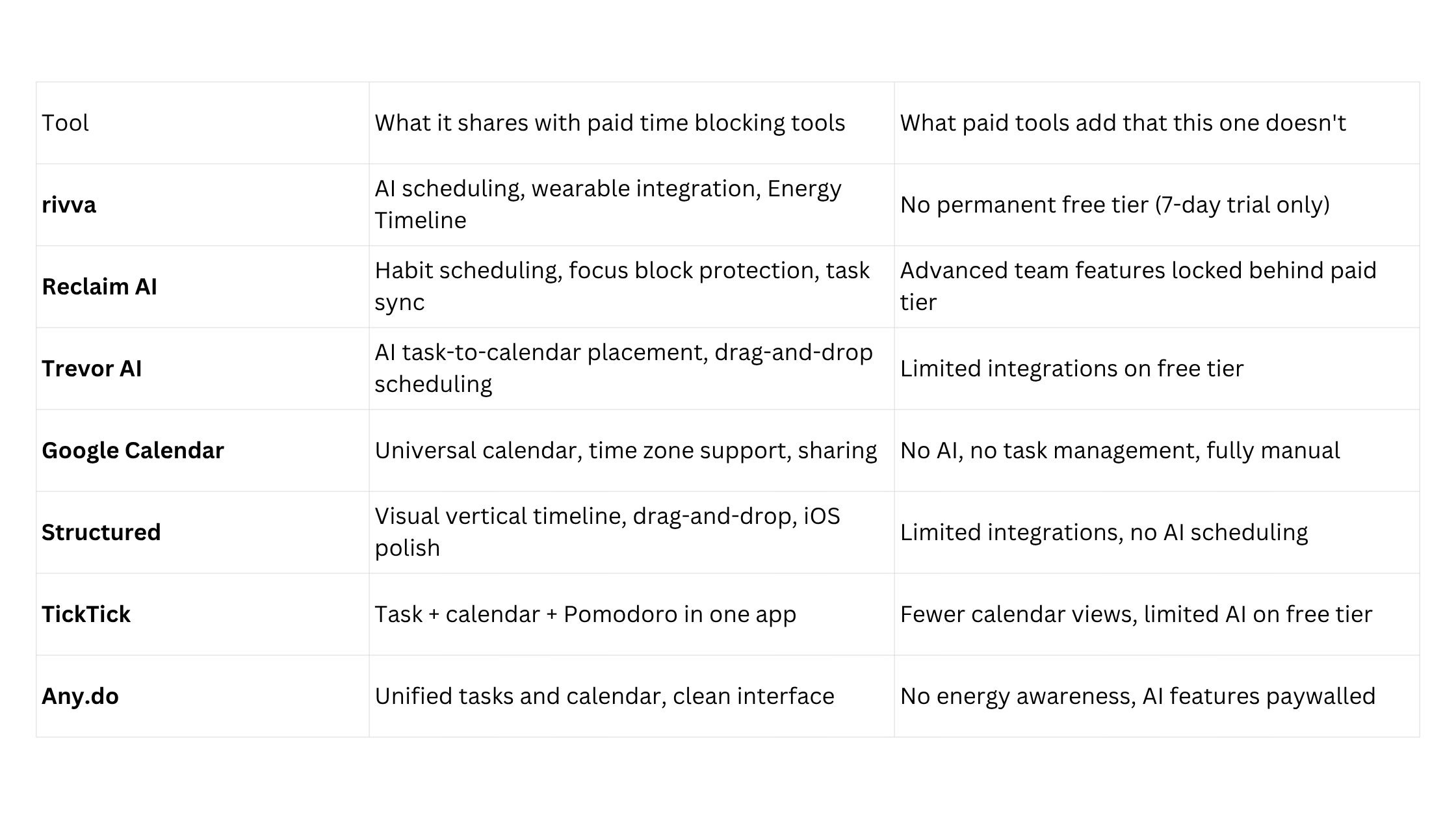
Quick comparison
Detailed tool breakdowns
rivva
Best for: People who want their schedule to reflect how they actually feel, not just what needs to get done.
rivva is an AI daily planner that connects to wearables — Apple Watch, Fitbit, Oura, and Whoop — to read sleep quality and recovery data overnight. From that data, it builds an Energy Timeline: a visual map of your cognitive peaks and dips throughout the day. Nia, rivva’s AI assistant (available by text and voice), then takes your task list and places your most demanding work into your peak windows, and lighter tasks into the lower-capacity periods.
Key features:
Energy Timeline built from wearable sleep/recovery data
Nia AI assistant for text and voice-based scheduling
Smart Scheduling: hard tasks in peak windows, lighter work in dips
Multi-calendar sync (Google, Outlook, iCloud)
Available on iOS, Android, and web
Pricing: 7-day free trial, then $10/month or $80 per year.
Pros:
The only scheduling tool on this list that connects physiological recovery data to task placement
Nia’s voice interface makes it usable when you’re in motion
Automatically adapts your day when your energy data shifts
Cons:
No permanent free tier — the 7-day trial is zero-commitment, but requires a paid subscription after
Wearable integration is the core value driver
Newer entrant, so the ecosystem of integrations is still growing
Reclaim AI
Best for: Google Calendar users who want AI to protect focus time and build habits automatically.
Reclaim AI’s free tier includes habit scheduling, task sync, and basic focus time blocking. When meetings appear, Reclaim moves habits and focus blocks rather than letting them disappear entirely.
Pricing: Free tier available. Paid plans start at approximately $10/month.
Trevor AI
Best for: People who want basic AI scheduling without a steep learning curve.
Trevor AI connects to your task manager, surfaces your unscheduled tasks in a sidebar, and lets you drag them onto your calendar or use AI to suggest where they should go.
Pricing: Free tier available. Pro plans start around $4/month.
Google Calendar
Best for: Anyone who wants a universal, free scheduling baseline with maximum compatibility.
Time blocking in Google Calendar means manually creating events for focused work, not just meetings. The integrations are universal, the interface is familiar, and the price is unbeatable.
Pricing: Free with a Google account.
Structured
Best for: Visual thinkers, especially on iOS, who want to see their day as a clear vertical timeline.
Structured is a visual daily planner with a distinctive vertical timeline interface. You add tasks with durations, and they stack visually in chronological order.
Pricing: Free tier available. Pro plan around $4/month.
TickTick
Best for: People who want tasks, calendar, and Pomodoro timer in a single free app.
TickTick’s calendar view and built-in Pomodoro timer make it a credible time blocking tool, especially for people who prefer to manage everything in one place.
Pricing: Free tier available. Premium plan around $28/year.
Any.do
Best for: People who want a simple, unified tasks-and-calendar experience without much setup.
Any.do‘s daily planner feature walks you through your tasks each morning and helps you decide what to schedule — a lightweight version of intentional time blocking.
Pricing: Free tier available. Premium around $5/month.
How to choose
Start with Google Calendar if you want zero friction and no new tools.
Use Reclaim AI’s free tier for AI scheduling, particularly if you use Google Calendar and want habits protected.
Try Structured’s free tier if you’re visual and on iOS.
Use TickTick for tasks, calendar, and Pomodoro in one free app.
Try rivva’s 7-day free trial if you want energy-aware scheduling — the only tool here that connects your sleep and recovery data to task placement.
FAQ
Is there a truly free time blocking app that works well?
Yes. Google Calendar is free and always will be. Reclaim AI’s free tier is also genuinely functional. TickTick’s free tier covers tasks, calendar, and Pomodoro in one app.
What makes a time blocking app “AI-powered”?
In most tools, AI scheduling means the app can suggest or automatically place tasks into your calendar based on priority, deadlines, and available time. More advanced implementations — like rivva — also factor in physiological data to match task difficulty with cognitive availability.
Bottom line
rivva belongs at the top of this list because it represents a category that none of the truly free tools can match: scheduling that responds to how you actually feel, not just what’s on your list.