
The Complete Daily Planning Guide with rivva
Master daily planning with rivva. Learn how to review your commitments, prioritize what matters, schedule around your energy peaks, and adapt as your day unfolds.

Planning your day effectively isn’t about filling every hour with tasks. It’s about gaining clarity on what actually matters, then scheduling work when you’re most capable of doing it well.
Whether your day starts with a blank slate or is already packed with meetings, emails, and commitments, rivva helps you plan with intention—not just react to what’s in front of you.
Why Daily Planning Matters
Most people start their day by opening email or Slack and immediately reacting to whatever demands their attention. By noon, they’ve been busy for hours but haven’t made progress on anything that actually moves their goals forward.
The alternative is simple: 30 seconds of intention before the chaos starts.
Daily planning gives you that clarity. It helps you:
Distinguish between what’s urgent and what’s actually important
Protect time for work that requires deep focus
Set realistic expectations for what you can accomplish
End your day feeling accomplished instead of overwhelmed
With rivva, daily planning isn’t about creating a perfect schedule. It’s about understanding your capacity, aligning work with your energy, and adapting as the day unfolds.
Before You Begin: Start With Clarity
Before scheduling anything, ask yourself one question:
“What must I realistically achieve by the end of today?”
Notice we said “realistically.” Not everything in your inbox, calendar, or task list needs to happen today. Some things can wait. Some things aren’t actually your responsibility. Some things seemed important last week but don’t matter anymore.
This question immediately helps you deprioritize work that doesn’t deserve your time today—even if it exists in your inbox or appears on your calendar.
Once you’re clear on what actually matters, there are two main ways to plan your day with rivva.
Path 1: Review What rivva Has Already Surfaced
If you’ve connected your email and calendar to rivva, it’s already done some of the heavy lifting for you. It has pulled in your meetings, extracted tasks from your inbox, and organized them in one place.
Step 1: Review Your Inbox
Open the Inbox tab in rivva.


If you’ve granted rivva access to your Gmail, it automatically scans for action items—meeting follow-ups, Notion comments, GitHub updates, approval requests, anything that requires your attention. These appear in your Inbox where you can decide what to do with them.
For each item, ask yourself:
Does this need to be done today? If yes, approve it and schedule it.
Can this wait? If yes, schedule it for a future date.
Is this even relevant? If no, delete it.
To schedule tasks from your Inbox:
Add to Tasks and manually decide when to do them, or
Smart Schedule, where rivva uses available context (deadlines, task type, priority, estimated duration) to find the best time in your day based on your energy and availability.
Tasks that don’t need immediate attention can be scheduled for later or dismissed entirely.
Step 2: Review Your Calendar Events
If you’ve given rivva has access to your calendar, it automatically pulls in your meetings and events.
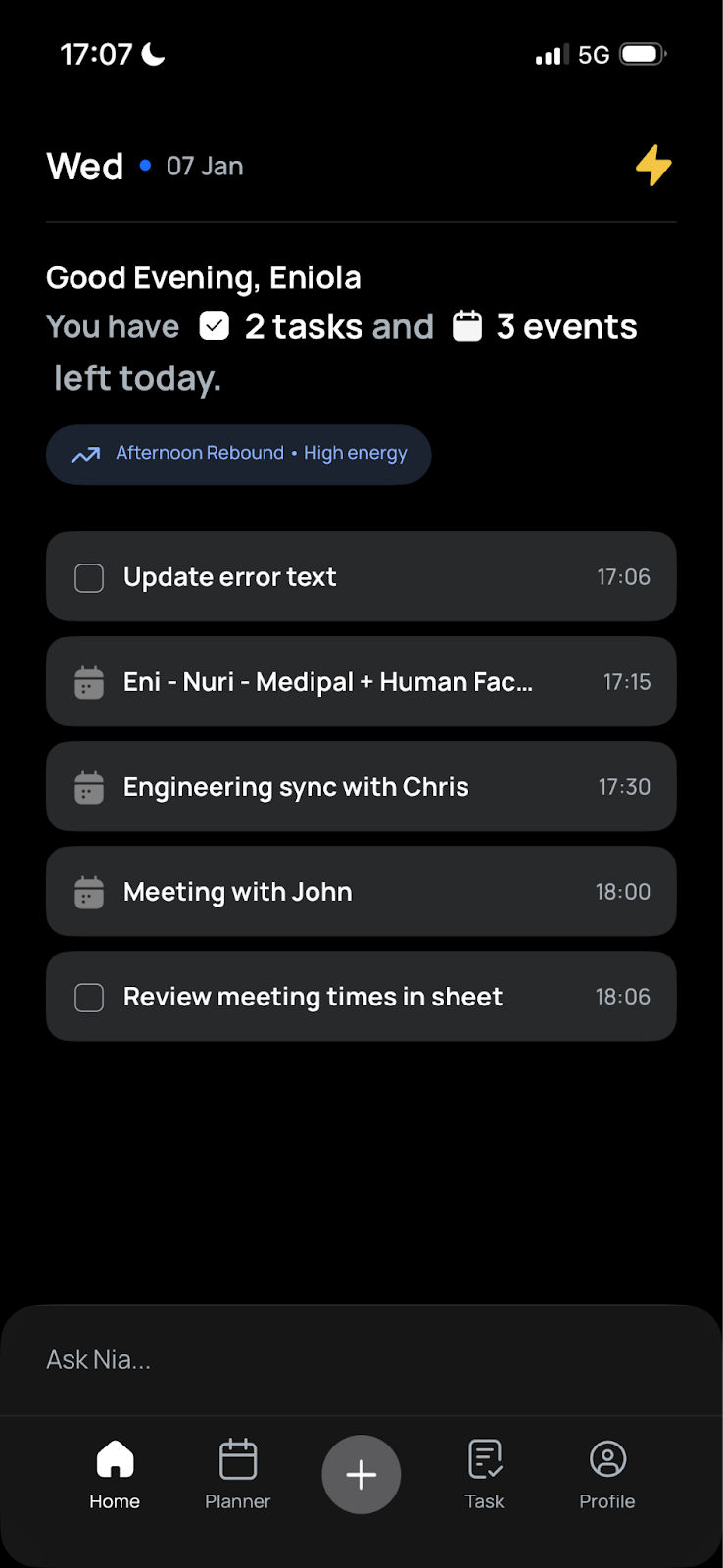
These events, along with approved tasks from your Inbox, form the foundation of your day’s schedule. You’ll see them together in your Planner, giving you a complete picture of what your day looks like.
Now you know what’s already demanding your time. The next step is to fill in what’s missing.
Path 2: Define New Priorities Intentionally
Not everything that matters starts in your inbox or calendar.
For priorities that aren’t yet captured—strategic work, focused projects, personal commitments—you can add them to your day in two ways:
Option 1: Plan with Nia
Nia is your AI assistant inside rivva. You can chat with her to plan your day, whether you’re starting from scratch or working around existing commitments.
How to start:
Simply say: “Hey Nia, let’s plan my day.”
From there, Nia helps you introduce new priorities into your schedule.
Planning with no existing schedule
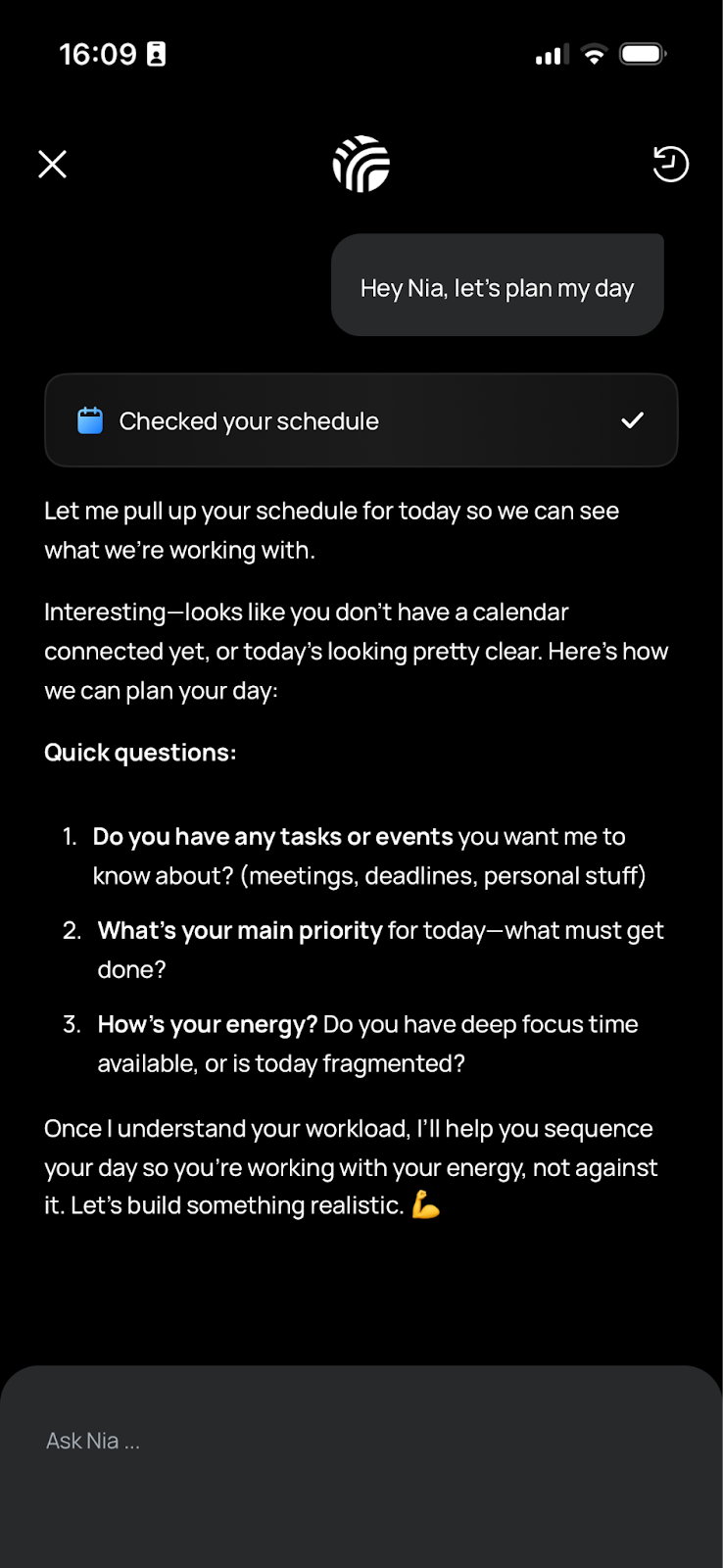
If your day is blank, Nia will ask what you’re working on. You can:
Do a brain dump of everything on your mind
Paste a task list from Notion, Apple Notes, or anywhere else
Tell Nia your top priorities for the day
Nia will turn your input into tasks, estimate how long each will take, and schedule them based on your energy and availability.
Example prompt:
“I need to finish the budget proposal, review candidate resumes, prep for tomorrow’s client call, and block time to think through our Q2 strategy. Help me plan this out.”
Nia will break it down, assign deadlines if you mentioned them, and schedule everything intelligently.
Planning with some existing tasks
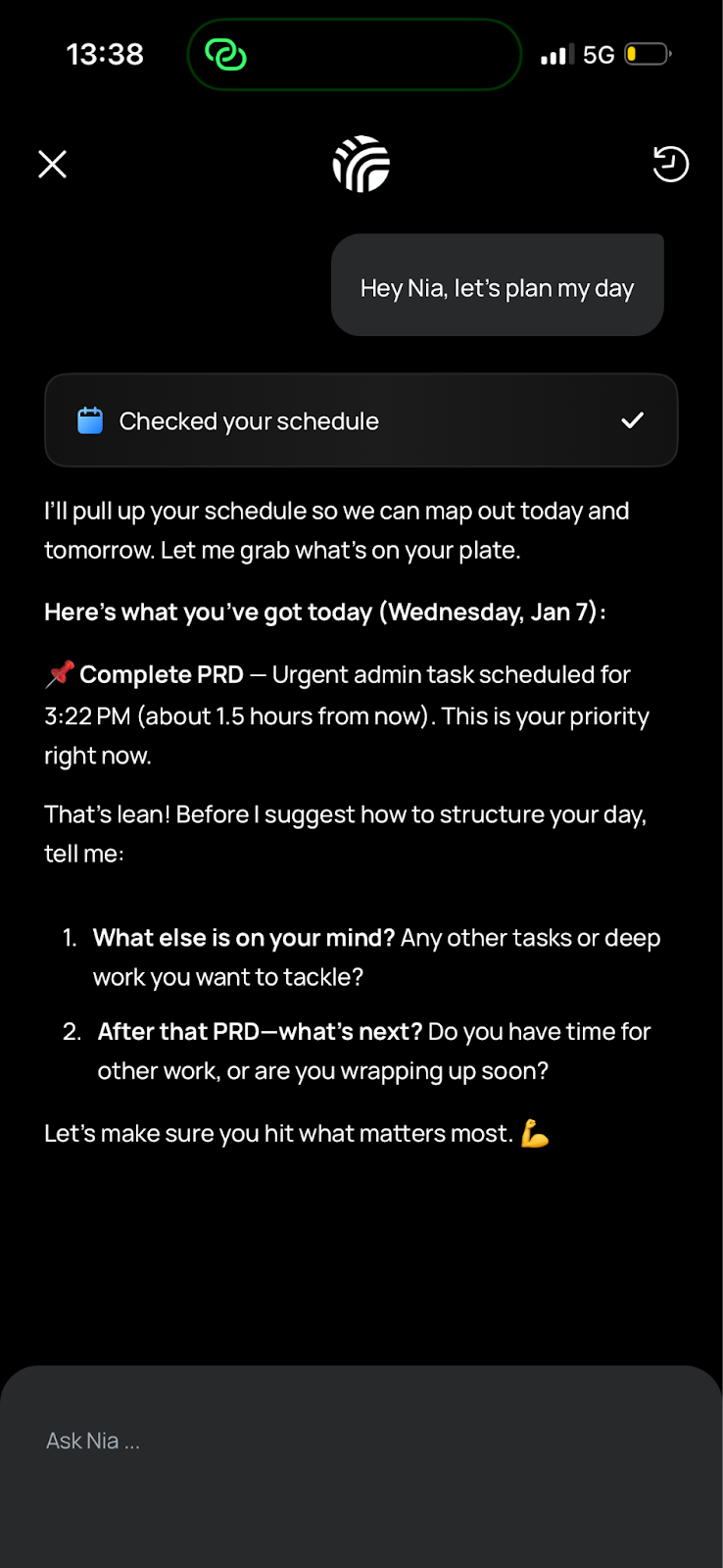
If you already have tasks in rivva but want to add more, Nia will fit new priorities around what’s already scheduled.
Example prompt:
“I have three meetings today but I also need to finish the marketing deck and respond to Sarah’s feedback. Can you fit those in?”
Nia will look at your existing schedule, find available slots, and schedule the new work when you’re most capable of doing it.
Planning with a packed day
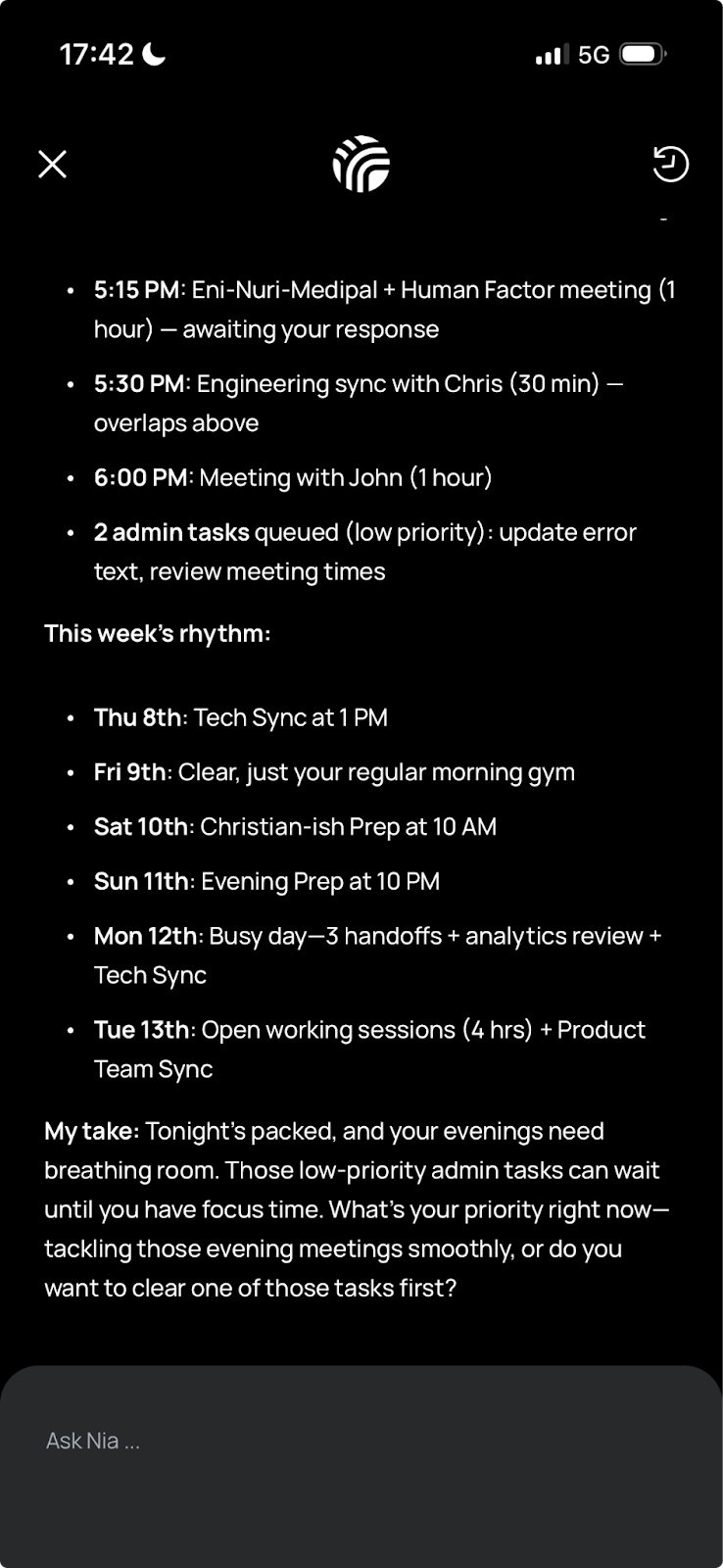
If your calendar is already full, Nia will help you decide what’s realistic and what needs to be deferred.
Example prompt:
“I have back-to-back meetings from 9am to 4pm but I also need to finish a report and review a contract. What should I do?”
Nia might suggest:
Scheduling the report for a high-energy slot tomorrow morning
Handling the contract review during a lower-energy period today (if it’s quick)
Identifying which meetings you could skip or shorten
This is where rivva becomes particularly valuable: it helps you see when you’re overcommitting and offers realistic alternatives.
How to Give Nia Context
The more explicit you are when describing tasks, the better Nia can help you plan. Useful context includes:
Title of the task or event
How long it typically takes (duration)
The type of task it is (deep work, admin, personal, etc.)
Priority level (high, medium, low)
Deadline (if applicable)
But don’t worry if you don’t have all this information. Nia is intelligent enough to infer most details from just the task title.
Example:
You could say: “Add task: finish budget proposal”
Nia will:
Recognize it’s likely a deep work task
Estimate it will take 1-2 hours
Schedule it during your peak energy hours
Ask if there’s a specific deadline
Let Nia Schedule Your Day
Once you’ve input your tasks and events, Nia reviews everything and schedules them based on:
Task type (deep work gets peak hours, admin work gets lower-energy slots)
Priority (high-priority tasks are scheduled first)
Your energy patterns (demanding work aligns with your performance peaks)
Your availability (tasks fit around meetings and existing commitments)
If Nia sees that you’re overcommitting and not all tasks can realistically be done today, it will suggest future dates for the lower-priority items.
All you need to do is approve the schedule, and you’re set.
Option 2: Use the Task Manager
If you prefer to plan manually, you can create tasks directly through the Task Manager.
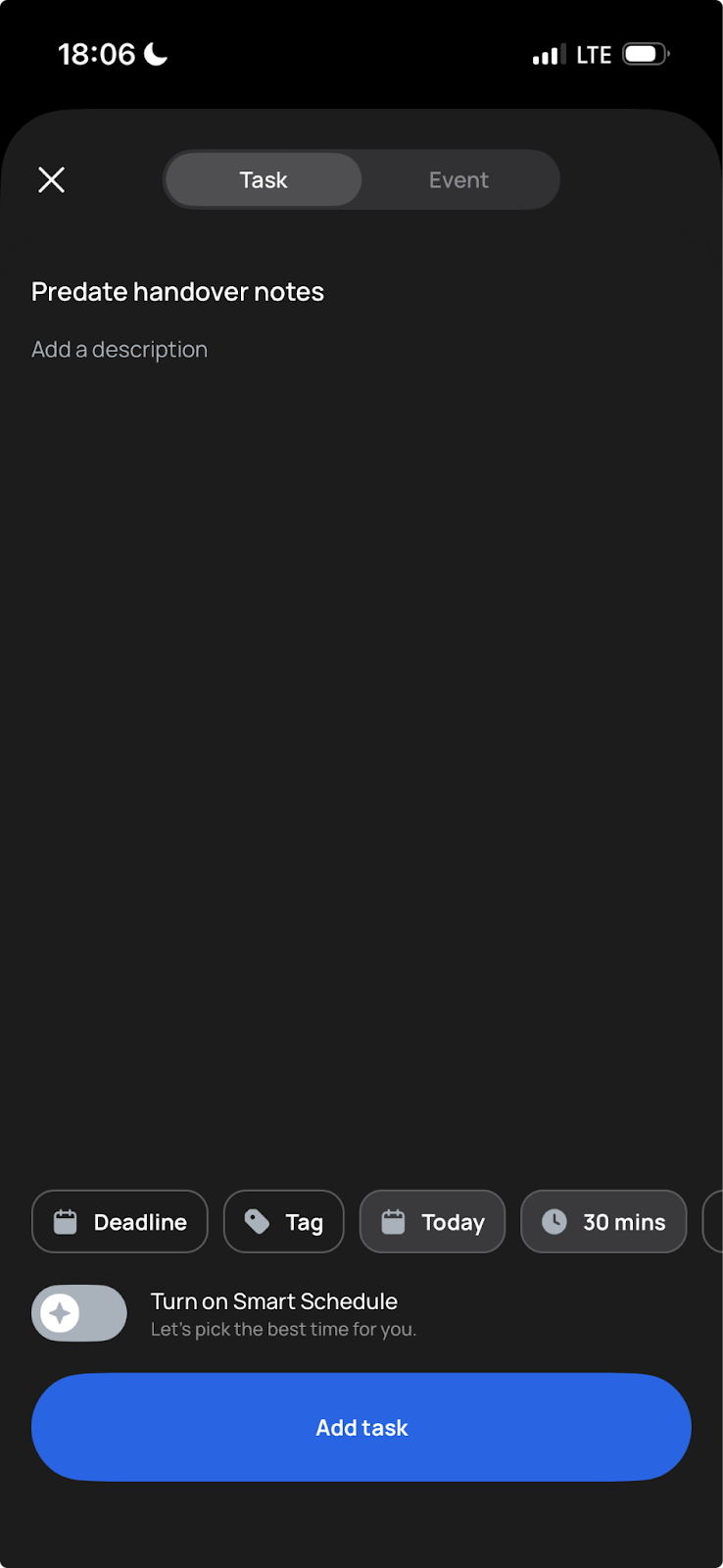
How to create a task:
Open the Task Manager
Click + Add Task
Enter the task details
What to include:
Task name (required)
Duration (how long you expect it to take)
Tag (the type of task: deep work, admin, personal, etc.)
Priority (high, medium, low)
Deadline (when it needs to be done)
Scheduling options:
Once you’ve created a task, you have two choices:
Smart Schedule (recommended): Turn on the Smart Schedule toggle and rivva will find the best time to schedule the task based on your energy data, availability, and task requirements.
Manual Schedule: Turn off the Smart Schedule toggle and choose a specific time yourself.
Pro Tip: We recommend using Smart Schedule for the best experience. rivva knows when you’re sharp, when you’re running low, and when you have space in your calendar. Let it handle the scheduling while you focus on execution.
Your Day at a Glance: The Planner
Once you’ve planned your day—whether through Nia or the Task Manager—you’ll see a clear overview of your schedule in the Planner.
The Planner shows:
All your scheduled tasks
All your calendar events
Your energy timeline (peaks and dips throughout the day)
Breaks and recovery time
This is your command center. Everything you need to accomplish today, organized by when you’re best equipped to handle it.
How to use your Planner:
Check it first thing in the morning to see what your day looks like
Refer to it throughout the day to stay on track
Use it to see what’s next without constantly context-switching
Adapting Your Plan as the Day Unfolds
Planning doesn’t stop once your day is scheduled. The best plans adapt to reality.
Meetings run long. Priorities shift. Energy fluctuates. Unexpected work appears.
That’s normal. And that’s where rivva really shines.
What Nia Can Help With During Your Day
Throughout the day, you can ask Nia to:
Break down tasks
“This task feels overwhelming. Help me break it into smaller steps.”
Reschedule tasks or events
“My 2pm meeting is running long. Can you reschedule the rest of my day?”
“I’m too tired for deep work right now. What can I do instead?”
Get coached on focus
“I keep getting distracted. What should I do?”
“I have 30 minutes before my next meeting. What’s the best use of this time?”
Maximize your energy
“I’m feeling low energy. Should I push through or take a break?”
“When’s my next peak energy window?”
Nia doesn’t just schedule your work. She helps you navigate your day in a way that feels sustainable.
At the End of the Day: Close the Loop
The end of your workday is just as important as the beginning.
rivva gives you a space to pause, review what actually happened, and close the loop on your work.
What to Do Before You Sign Off
1. Mark completed tasks
Go through your Planner or Task Manager and check off everything you finished. This isn’t just administrative—it’s deeply satisfying and gives you a clear sense of what you accomplished.
2. Review what didn’t get done
Not everything will get done. That’s okay.
For tasks that didn’t happen, ask yourself:
Does this still matter? If yes, reschedule it. If no, delete it.
Why didn’t it get done? Did you run out of time? Was it lower priority than you thought? Did you lack the energy or focus it required?
This reflection helps you plan more realistically tomorrow.
3. Reschedule unfinished tasks
For anything that still needs to happen, reschedule it to a future day. You can do this by:
Asking Nia: “Reschedule my unfinished tasks to tomorrow”
Manually dragging them in the Task Manager
Important: Rescheduling tasks isn’t a failure. It’s how rivva helps you plan realistically.
Priorities change. Meetings run long. Energy fluctuates.
By updating what was completed and adjusting what wasn’t, your next day starts with better context and a clearer plan.
Best Practices for Daily Planning with rivva
1. Plan your day the night before or first thing in the morning
Don’t wait until mid-morning when you’re already deep in email or meetings. Give yourself clarity before the chaos starts.
2. Be realistic about your capacity
You don’t have 8 hours of deep work capacity. You have 3-4 at most. Plan accordingly.
3. Protect your peak energy hours
Use your Energy Timeline to identify when you’re naturally sharp. Block those hours for your most demanding work. Batch meetings and admin tasks during lower-energy periods.
4. Leave buffer time
Don’t schedule every minute. Meetings run long. Tasks take longer than expected. Unexpected work appears. Build in breathing room.
5. Review your plan mid-day
Around lunchtime, check in on your Planner. Are you on track? Do priorities need to shift? Adjust as needed.
6. Don’t carry guilt about what didn’t get done
If you consistently don’t finish your planned work, you’re not failing—you’re planning unrealistically. Adjust your expectations and keep moving forward.
Common Daily Planning Scenarios
Scenario 1: “My calendar is packed with meetings. When do I do actual work?”
If your calendar is full of meetings, you have two options:
Option A: Protect time for focused work
Use rivva to block 2-3 hour chunks on your calendar for deep work during your peak energy hours. Mark yourself as busy. Now when people try to schedule meetings, they can only book your lower-energy slots.
Option B: Batch light work around meetings
If you can’t protect large blocks, use the gaps between meetings for quick, admin-style tasks. Save deep work for a day when you have more space.
Ask Nia: “My calendar is full today. What tasks can I realistically fit in between meetings?”
Scenario 2: “I have no meetings but 50 tasks. Where do I start?”
This is where rivva’s Smart Schedule becomes invaluable.
Don’t try to manually decide what to do first. Instead:
Review your task list and identify the 3-5 tasks that actually matter today
Use Smart Schedule to let rivva organize them based on priority, deadlines, and your energy
Focus on executing, not re-prioritizing
Ask Nia: “I have too many tasks. Help me identify what actually matters today and schedule it.”
Scenario 3: “Something urgent just came up. Now what?”
Ask Nia: “An urgent task just came up: [describe it]. Can you fit this into my day and reschedule what’s less important?”
Nia will assess your remaining capacity, fit in the urgent work, and defer lower-priority tasks to tomorrow or later in the week.
Final Thoughts
Daily planning with rivva isn’t about creating a perfect schedule. It’s about:
Starting your day with clarity instead of chaos
Aligning your work with your capacity
Protecting time for what actually matters
Adapting when reality doesn’t match the plan
The goal isn’t to finish everything. The goal is to make meaningful progress on what’s important while staying sustainable.
That’s what rivva helps you do.