
Best Sunsama Alternatives for ADHDers
These planning tools reduce overwhelm instead of creating more of it.

There is a version of you that wakes up, opens a planning app, and spends fifteen calm minutes sorting the day into tidy time blocks. Sunsama was built for that person. The guided ritual, the daily shutdown, the integrations that pull in every task from every tool — it is genuinely thoughtful software. But if you have ADHD, the ritual can become its own obstacle. Another thing to fail at. Another way to fall behind before your day has even started.
That is not a knock on Sunsama. It is a recognition that the “daily planning ritual” model works brilliantly for people with consistent executive function and badly for people whose executive function fluctuates by the hour.
Why people look for Sunsama alternatives
Consistency. Sunsama’s model assumes you will show up for the ritual every day. Miss a day and the backlog grows. ADHD makes consistency hard by design.
Cost. At roughly $20 per month, Sunsama is on the expensive end for a planning app that you may use three days a week.
No energy awareness. Sunsama does not know that you had two hours of fragmented sleep. It treats 9am and 3pm as equivalent scheduling slots — which they are not, especially with ADHD.
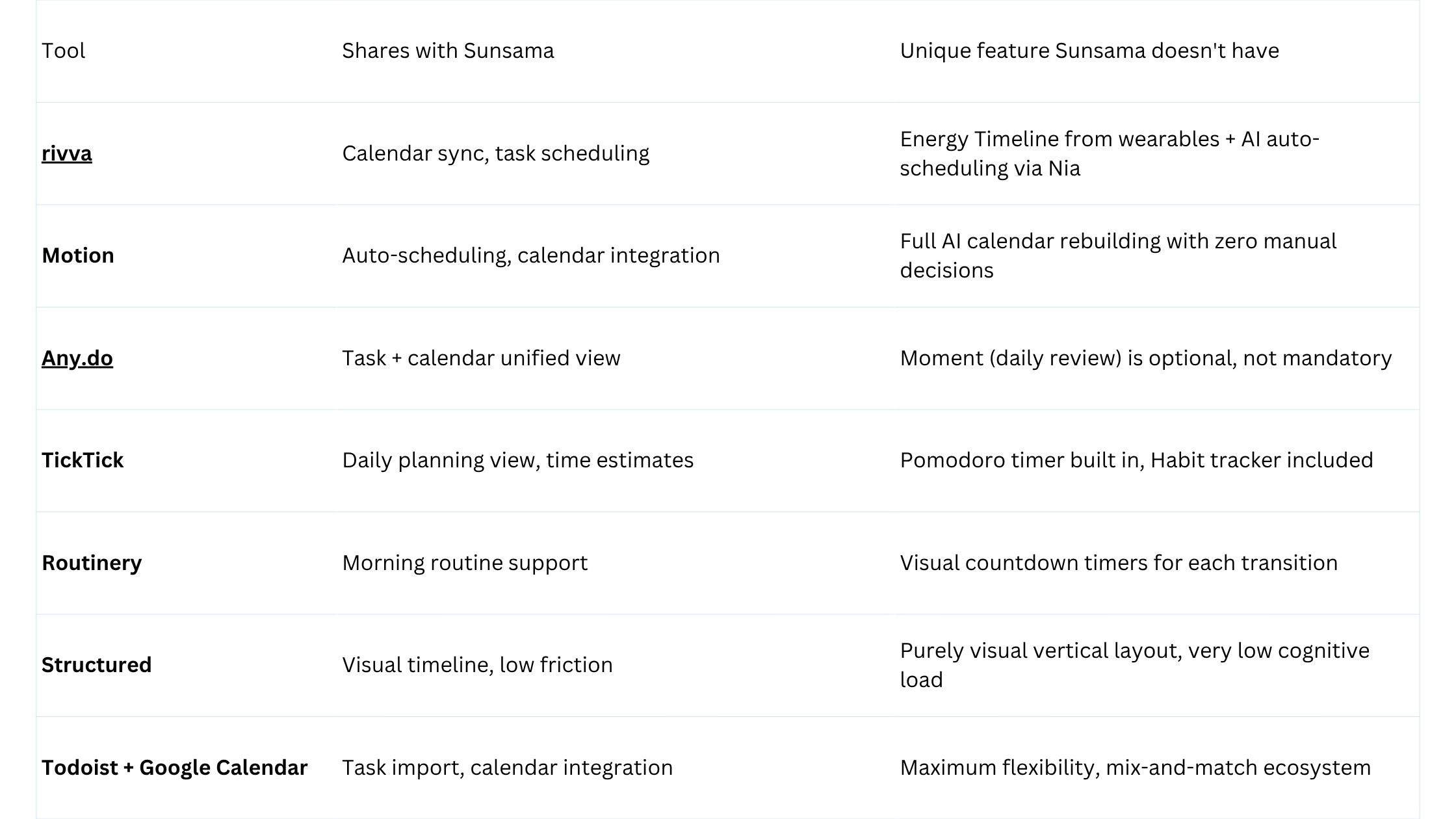
Quick comparison
Detailed tool breakdowns
rivva
Best for: ADHD users who have tried willpower-based planning systems and want something that works with their energy, not against it.
rivva connects to Apple Watch, Fitbit, Oura, or Whoop, reads your sleep and recovery data, and builds an Energy Timeline — a day view that shows you when your cognitive capacity will likely peak and when it will dip. The AI assistant, Nia, handles the actual scheduling: you tell Nia what needs to get done, and it places deep-focus work during your peak windows and lighter tasks during your lower-capacity periods.
This is a fundamentally different model from Sunsama. Instead of asking you to decide each morning which task deserves which slot, rivva does the deciding based on your body’s actual data. For ADHD brains that struggle with task-to-time mapping, this removes a significant source of friction.
Nia works through text or voice. On low-executive-function days, saying “Nia, move my afternoon client prep to tomorrow morning” while walking to the kitchen is much more achievable than typing a structured daily plan.
Key features: Energy Timeline from wearable data, Nia AI assistant (text + voice), Smart Scheduling, Scheduling Links, multi-calendar sync, iOS, Android, web.
Pricing: Free tier available. $10/month or $80 per year for premium with a 7-day free trial. Available on iOS, Android, and web.
Pros:
Energy-aware scheduling removes the daily cognitive overhead of time-blocking decisions
Nia is accessible on low-capacity days when structured planning feels impossible
Voice input makes it usable across contexts — commuting, moving between tasks, post-lunch crash
Cons:
Requires a wearable to get the full Energy Timeline benefit
Paid after trial
Newer product
Motion
Motion takes the most aggressive possible approach to the “I hate planning” problem: it plans for you. Add tasks, mark deadlines and priorities, and Motion continuously rebuilds your calendar.
Pricing: Approximately $19–34/month.
Any.do
Best for: ADHD users who want low-friction task and calendar management without a mandatory daily ritual.
Any.do is one of the few apps that genuinely succeeds at being simple without feeling incomplete. Tasks and calendar live in the same view. The daily planner (”Moment”) suggests a review of your tasks each morning but does not demand it.
Pricing: Free tier available. Premium is approximately $5/month.
TickTick
Best for: ADHD users who want task management, Pomodoro timers, and habit tracking in one affordable app.
TickTick is one of the most feature-dense apps on this list at its price point. The Pomodoro integration is particularly relevant — for people who struggle with sustained focus, the external structure of a timed work sprint can bridge the gap between “I should start” and “I am actually working.”
Pricing: Free tier available. Premium is approximately $3.99/month.
Routinery
Best for: ADHDers who struggle most with mornings, transitions, and starting routines.
Routinery is specifically a routine and transition coach. You build a morning routine, an evening wind-down, a post-lunch reset — and Routinery walks you through each step with visual timers and gentle prompts.
Pricing: Free tier available. Pro approximately $4.99/month.
Structured
Best for: Visual thinkers who want to see their day as a timeline with minimal cognitive overhead.
Structured is a beautifully minimal visual day planner. Your tasks and events appear on a vertical timeline. You drag and drop. No guided ritual, no shutdown ceremony, no AI — just a clean visual representation of where things sit in your day.
Pricing: Free tier available. Pro approximately $3/month.
Todoist + Google Calendar
Best for: People who want maximum flexibility and are comfortable assembling their own system.
Todoist and Google Calendar integrate well enough to function as one system — and together they cover most of what Sunsama offers at a significantly lower cost ($4/month vs. $20/month).
Pricing: Todoist free or $4/month Pro. Google Calendar: free.
How to choose
Start with the question: Do I struggle more with planning or with starting?
Planning stage → rivva or Motion. rivva’s Energy Timeline and Nia AI remove the cognitive overhead of daily scheduling decisions. Motion removes them almost entirely.
Starting and transitioning → Routinery or Structured. Routinery handles transitions explicitly. Structured makes the day visible enough to reduce the ambiguity that makes starting hard.
Low-friction entry point → rivva, Any.do or TickTick. They have free tiers and work on most platforms.
FAQ
Q: Is rivva actually useful without a wearable?
A: Yes, though with reduced functionality. Without wearable data, rivva cannot build a personalized Energy Timeline, but Nia can still handle scheduling, Scheduling Links work normally, and calendar sync is fully functional.
Q: I loved Sunsama’s shutdown ritual specifically — which app has something similar?
A: Sunsama is genuinely unique in the intentionality of its shutdown ritual. Of the alternatives here, Any.do‘s Moment review comes closest to a lightweight version of the daily review model.
Bottom line
If one thing characterizes the best planning tools for ADHD, it is this: they reduce the number of decisions you have to make to get started, not add to them. Use that as your filter, and the right choice will become clearer.