
Best Motion Alternatives in 2026 (Honest Review)
Motion is powerful but can be rigid, expensive, and overwhelming for fluctuating energy. These alternatives actually work with how your brain feels day to day.

Let’s be fair to Motion for a second. It genuinely does something impressive: it looks at your task list, your calendar, your deadlines, and builds you a schedule automatically. For people who are good at estimating time and have relatively predictable days, that works. Motion removes a real source of friction — the blank-page paralysis of deciding what to do and when.
But if you’ve landed on this page, something didn’t click. Maybe it was the price. Maybe it was the rigidity — the feeling that Motion had a plan for your day and you were just along for the ride. Maybe your energy crashes in the afternoon, or you have days where even small tasks feel impossible, and Motion just kept rescheduling things into the same flat, undifferentiated grid.
Why people look for Motion alternatives
It gets expensive quickly
Motion starts at around $19/month for individuals and can reach $34/month. For a solo tool, that’s a real commitment.
It’s rigid when your capacity isn’t
Motion schedules tasks assuming you can do deep work at 9am and admin at 2pm — because it treats all hours roughly the same. There’s no concept of “I slept badly and today is a low-energy day.”
The black box problem
Motion makes scheduling decisions on your behalf, but it doesn’t always explain why. Over time, that opacity can erode confidence.
The learning curve is real
Motion is feature-rich: project templates, team features, priority settings, deadline logic — there’s a lot.
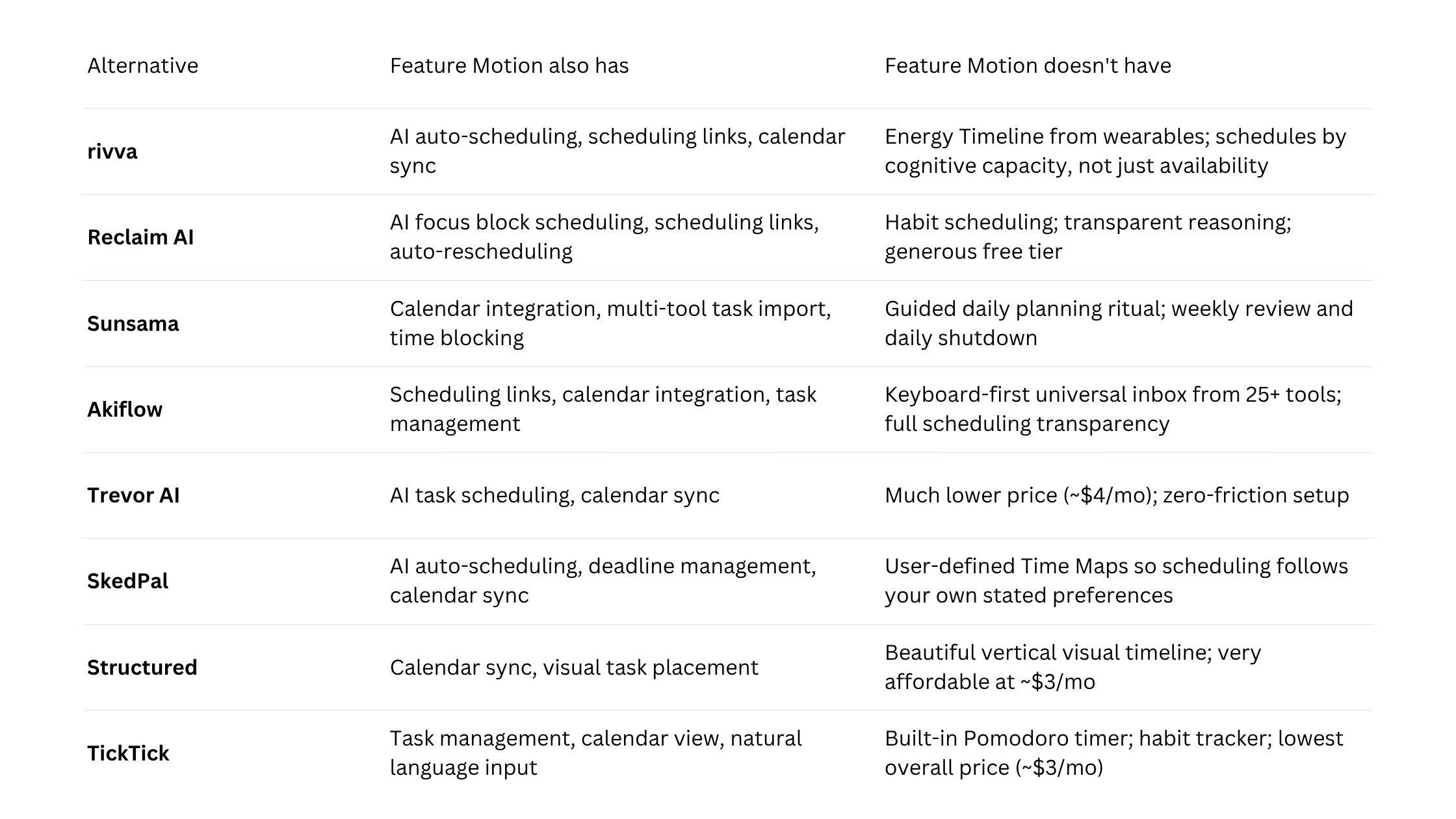
Quick comparison table
The best Motion alternatives in 2026
1. rivva
rivva is an AI daily planner that connects to your wearables and uses sleep and recovery data to forecast your cognitive energy peaks and dips throughout the day. Instead of treating your Tuesday like every other Tuesday, rivva actually knows whether you slept six hours or eight — and schedules your hardest tasks accordingly.
Best for: People with variable energy, neurodivergent users, anyone whose productivity is meaningfully affected by sleep quality or fluctuating capacity.
Key features:
Energy Timeline that maps your forecasted cognitive peaks and dips based on real sleep data
Smart Scheduling that automatically moves hard tasks into your peak windows
Nia AI assistant available by text and voice
Scheduling links and multi-calendar support
Pricing: Free tier available. $10/month or $80/year for premium with a 7-day free trial.
Pros:
The only tool that actually adapts to your physical recovery state
Nia feels like a genuine planning conversation
Transparent scheduling — when rivva moves a task, it shows you why
Noticeably cheaper than Motion
Cons:
Requires a compatible wearable for full energy forecasting
Relatively newer product
2. Reclaim AI
Reclaim sits on top of Google Calendar and automatically schedules focus time blocks, habits, and tasks around your existing meetings.
Best for: Google Calendar users who want smarter focus time without rebuilding their whole planning system.
Pricing: Free tier available. Paid plans from approximately $8/month.
3. Sunsama
Sunsama is a deliberate daily planner — it guides you through a short morning ritual where you pull tasks from your various tools, time-block your day, and set a realistic intention.
Best for: People who want a structured daily planning ritual with more personal control.
Pricing: Approximately $20/month.
4. Akiflow
Akiflow is a power-user task manager with calendar integration and keyboard-first navigation. It pulls tasks from dozens of tools into a single command bar.
Best for: Technical users and power users who want maximum control with very fast input.
Pricing: Approximately $19/month.
5. Trevor AI
Trevor AI is an AI scheduling assistant designed to be simple. You add tasks, connect your calendar, and it suggests where those tasks should go in your day.
Best for: People who want basic AI-assisted scheduling with no setup friction.
Pricing: Free tier available. Paid tier approximately $4/month.
6. SkedPal
SkedPal gives you more control over the algorithm — you create time maps that tell SkedPal when you prefer to do what kind of work.
Best for: People who want AI automation but also want the algorithm to follow their own rules.
Pricing: Approximately $9/month.
7. Structured
Structured is a visual timeline app for iOS that shows your day as a clean vertical timeline with color-coded blocks.
Best for: Visual thinkers who want to see their day clearly and prefer manual control.
Pricing: Free tier available. Pro approximately $3/month.
8. TickTick
TickTick is a task manager that has a calendar view, natural language task entry, habits, Pomodoro timer, and multi-platform support.
Best for: People who want a stable, full-featured task manager with calendar integration.
Pricing: Free tier available. Premium approximately $3/month.
How to choose
If Motion felt opaque: Reclaim, Akiflow, or SkedPal give more visibility. rivva shows reasoning through your own energy data.
If Motion felt too expensive: rivva, Trevor AI, Structured, and TickTick are dramatically cheaper.
If Motion felt too rigid: rivva is the most direct solution — the only tool built around the idea that your cognitive capacity changes day to day.
If Motion felt overwhelming: Trevor AI or Sunsama will feel like a deep breath.
Bottom line
Motion built something genuinely useful. The problem isn’t the concept — it’s that the tool was designed for a version of productivity that assumes consistent energy, predictable days, and patience for a complex system.
If your main complaints are price and complexity, Trevor AI, Structured, or TickTick will feel like immediate relief. If you want something closer to Motion’s intelligence but more transparent, Reclaim or Akiflow are solid choices. If the reason Motion wasn’t working is that it couldn’t tell the difference between a day when you have everything and a day when you have very little — that’s the problem rivva was built to solve.