
Best AI Calendar Apps in 2026 (Tested on Real Schedules)
AI calendar apps promise to think for you. These actually do, without adding more decisions to your already full plate.

Most people search for “AI calendar app” expecting something that reads their mind. What they usually get is a slightly smarter version of what they already had — natural language entry, maybe some suggestions, and the same cognitive load they were trying to escape.
A genuinely useful AI calendar does something different. It takes the decisions off your plate entirely, or at least reduces the friction of making them. The best tools in 2026 go further — they factor in your energy, not just your availability
What makes an AI calendar app actually useful?
Auto-scheduling that actually works. The app moves tasks into your calendar for you, not just suggests when you could do them.
Energy awareness. Your calendar doesn’t care if you’re exhausted. The ones that do place demanding tasks when you’re genuinely capable of doing them.
Integration depth. An AI calendar that only sees one calendar misses a lot.
Transparency and trust. If you don’t know why your AI rescheduled something, you can’t trust the system.
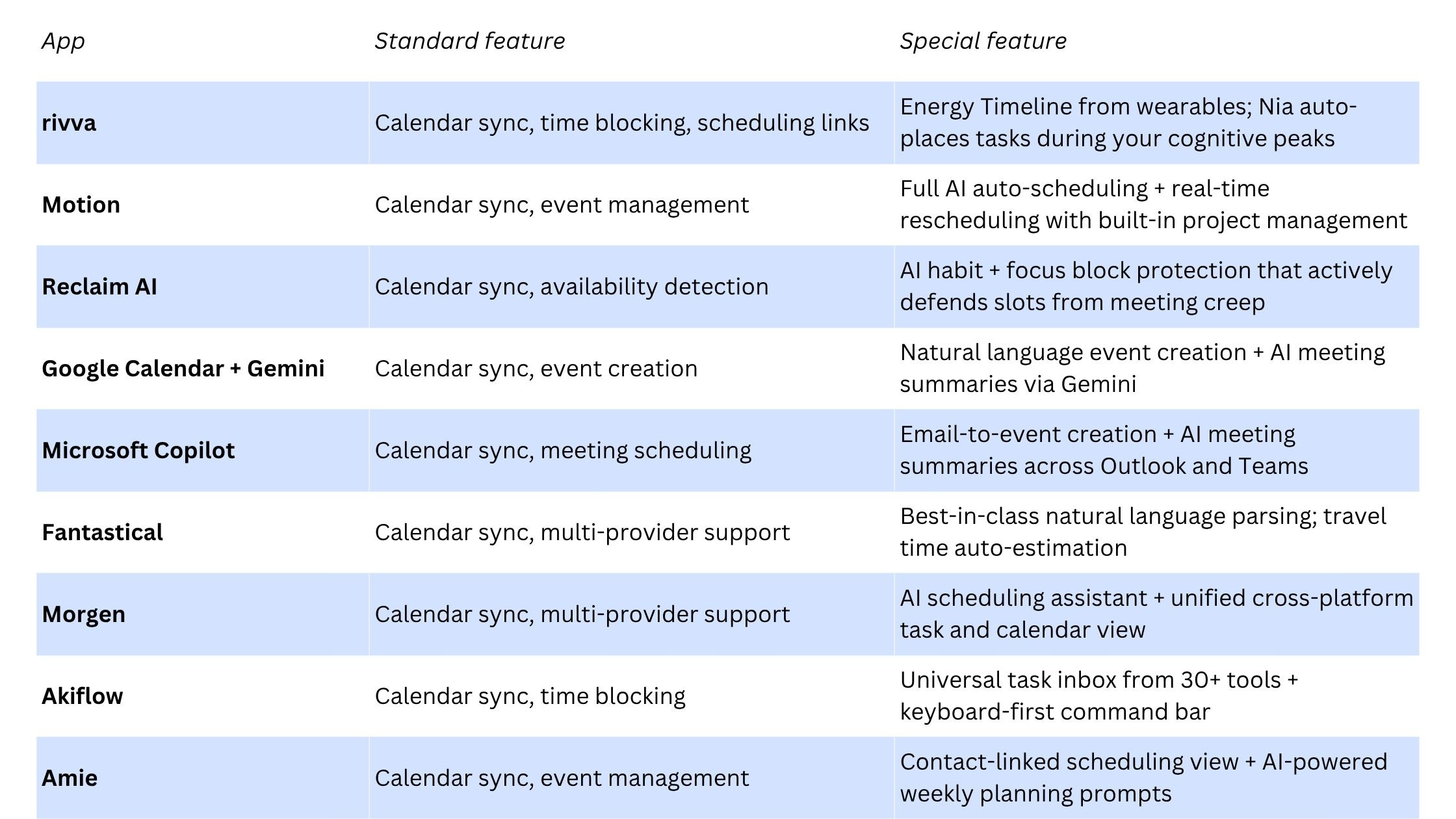
Quick comparison
The best AI calendar apps in 2026
1. rivva
rivva is the only AI calendar app that schedules around your biology, not just your availability. It connects directly to your wearables — Apple Watch, Fitbit, Oura, or Whoop — and uses your sleep and recovery data to forecast when your cognitive capacity will be highest throughout the day.
Best for: Knowledge workers, freelancers, and anyone who has noticed that the same task takes half the time depending on when they do it.
Key AI features:
Energy Timeline: a visual daily forecast built from your wearable’s sleep and HRV data
Nia AI assistant handles scheduling via text or voice
Smart Scheduling auto-places tasks based on energy level requirements
Scheduling Links for external bookings that respect your energy windows
Pricing: $10/month or $80 per year. 7-day free trial. Available on iOS, Android, and web.
2. Motion
Motion combines a task manager with an AI that continuously rebuilds your daily schedule as things shift.
Best for: Professionals managing multiple projects who want the AI to handle daily and weekly planning entirely.
Pricing: $19–34/month.
3. Reclaim AI
Reclaim integrates with Google Calendar and adds an AI layer that protects focused work, habits, breaks, and buffer time.
Best for: Google Calendar users who want to protect deep work and personal habits.
Pricing: Free tier available. Paid plans from approximately $8–$16/month.
4. Google Calendar + Gemini
Natural language event creation through Gemini — describe an event conversationally and it builds the invite. Smart scheduling suggestions based on your calendar patterns.
Best for: Anyone already embedded in Google Workspace who wants AI features without adding another subscription.
Pricing: Free to $20/month for Gemini features.
5. Microsoft Copilot (Outlook Calendar)
Microsoft Copilot brings AI into Outlook Calendar as part of Microsoft 365 — meeting scheduling, email-to-calendar creation, conflict detection.
Best for: Enterprise teams whose entire workflow already lives in Microsoft 365.
6. Fantastical
Fantastical has long been the gold standard for calendar UX on Apple devices, with advanced natural language parsing and travel time awareness.
Best for: Apple ecosystem users who want a beautiful, reliable calendar with smart natural language.
Pricing: Free tier available. Premium approximately $5/month.
7. Morgen
Morgen is a clean, cross-platform calendar that brings together your calendars and tasks in one view, with an AI scheduling assistant.
Best for: Cross-platform users who want a unified calendar-plus-tasks view with AI planning support.
Pricing: Free tier available. Pro approximately $9/month.
8. Akiflow
Akiflow is built for power users who want to pull everything into one command bar and schedule their day fast.
Best for: Power users and developers who want frictionless task capture and fast manual scheduling.
Pricing: Approximately $19/month.
9. Amie
Amie combines your calendar, tasks, and contacts into a social-forward productivity tool with smart event drafting and natural language scheduling.
Best for: Individuals and small teams who want a modern, social-forward calendar with AI conveniences.
FAQ
What’s the difference between an AI calendar and a smart calendar?
Most “smart calendars” use rules and patterns to make suggestions — they’re reactive. A true AI calendar acts on your behalf: it schedules tasks, reschedules conflicts, and makes decisions without you having to initiate them.
Do I need a wearable to use rivva?
The core scheduling and Nia assistant features work without a wearable. But the Energy Timeline — the feature that makes rivva genuinely different — is powered by sleep and recovery data from your Apple Watch, Fitbit, Oura Ring, or Whoop.
Which AI calendar is best if I’m overwhelmed by my schedule?
rivva and Motion are the two tools most worth looking at. Motion handles the most complexity. rivva is the better fit if your problem is scheduling the right tasks at the wrong times.
Bottom line
The honest answer is that most AI calendar apps automate the wrong thing. They make it easier to enter events, which was never the hard part. The hard part is deciding when to do the work that matters — and then actually being in the right state to do it.
If you wear a fitness tracker and you’ve noticed that when you work matters as much as how long you work, rivva is worth trying — the Energy Timeline is the most concrete expression of that insight available in any calendar tool right now.