
Apps Like Structured But Free (Best Alternatives)
Structured is beautiful — but free alternatives do more than replicate the look. These add the intelligence that makes a daily plan actually survive the day.

Before we get into the list, a quick note on what “free” actually means across these tools — because it means different things for different apps. Some offer a genuinely permanent free tier with no end date. Some offer a free trial that converts to paid. One is a one-time purchase. Being upfront about this matters, because the last thing anyone needs is to invest time setting up a workflow only to hit a paywall they were not expecting.
Here is how this list breaks down: Google Calendar, TickTick (free tier), Any.do (free tier), and Morgen (free tier) are all permanently free at their base level. rivva (free tier). Routinery has a free tier with limited features. Tiimo has a free trial period before becoming a paid subscription.
Now, why are any of these relevant to someone looking for a Structured alternative?
Structured is a genuinely lovely app. The vertical timeline is visually distinctive. Drag-and-drop scheduling is satisfying. The design aesthetic is clean and considered. At roughly $3/month Pro, it is one of the most affordable premium productivity apps available. But it has meaningful constraints: it is primarily an iOS and macOS product, the calendar sync reads from your calendar but cannot write back to it, and there is no AI, no automatic scheduling, and no mechanism for the plan to adapt when the day inevitably does not go as planned.
The apps below address those constraints in different ways. Some are free alternatives that replicate the visual simplicity. Others add AI scheduling or energy awareness that Structured does not have. All of them are worth knowing about if you are exploring the category.
Why people look for Structured alternatives
Structured earned its reputation through design quality and a clear philosophy: make the day visible. For people who struggle with time blindness — who lose track of how much time has passed, who underestimate how long tasks take, who cannot feel the day moving without a visual anchor — Structured’s timeline view is meaningfully useful in ways that list-based tools are not.
The reasons people look for alternatives tend to cluster around a few themes.
Platform coverage. Structured is built primarily for iOS and macOS. If you work on Windows, use Android, or need a tool that works consistently across all your devices, Structured’s ecosystem is limiting. Web access exists but is secondary to the native apps.
Calendar sync limitations. Structured reads from your calendar but cannot write events back to it. If you want a planning tool that lives inside your existing calendar ecosystem — adding events, modifying blocks, working bidirectionally — Structured’s read-only sync is a significant constraint.
No intelligence layer. Structured does not adapt to your day. If a meeting runs long, you manually reschedule everything around it. If you learn at 2pm that you are operating at 40% capacity, the plan has no mechanism to adjust. This is not a flaw in Structured’s design — it chose simplicity over intelligence — but it is a limitation for users whose days are unpredictable.
Cost. At $3/month, Structured Pro is already extremely affordable. But the free tier is limited, and for someone building their first productivity system, “start for free” matters.
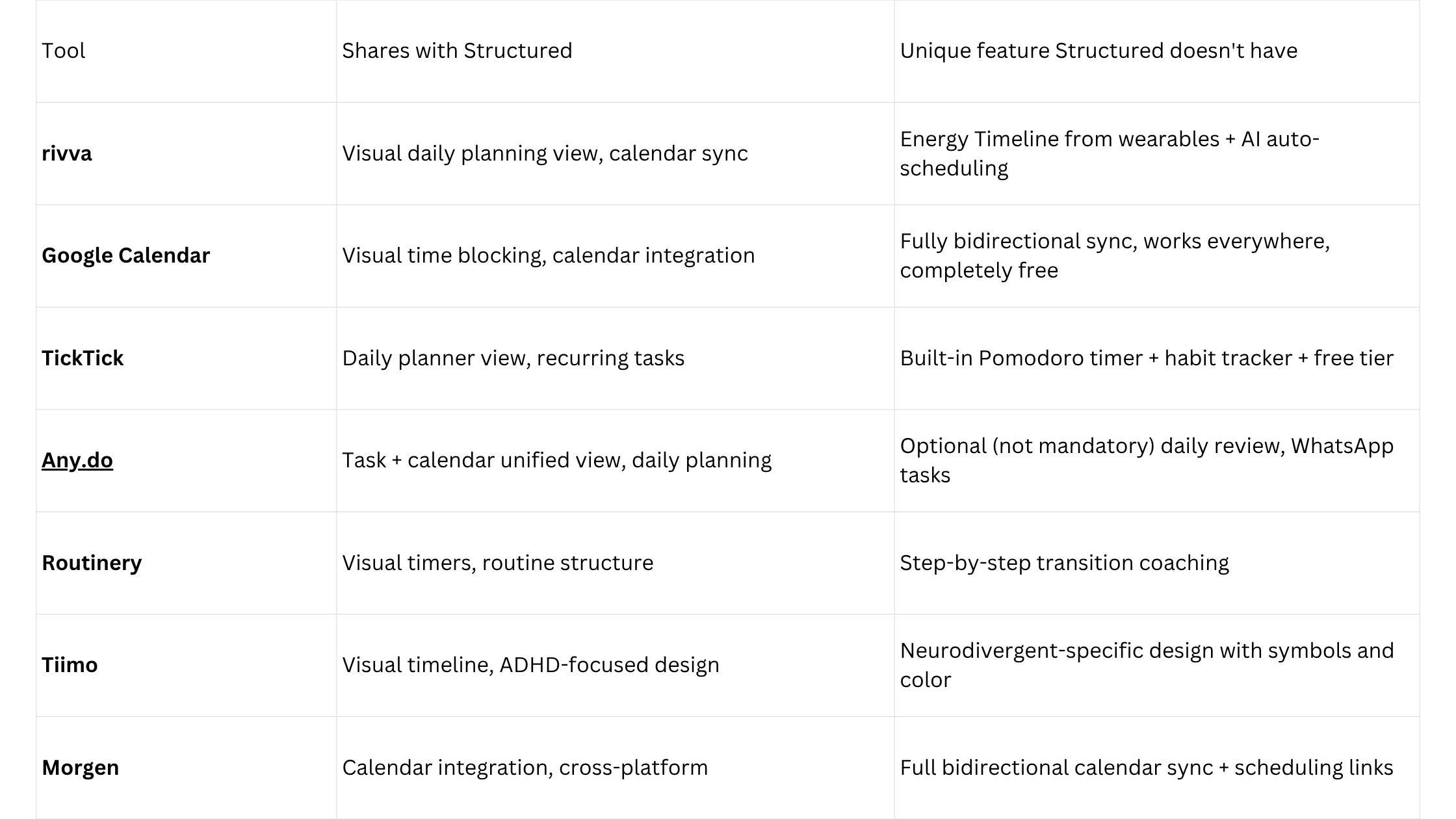
Quick comparison
rivva
Best for: Users who want Structured’s visual clarity plus an intelligence layer that keeps the plan alive when the day goes sideways.
The core value proposition — energy-aware scheduling combined with AI assistance — addresses Structured’s most significant limitation: the plan does not adapt.
rivva connects to Apple Watch, Fitbit, Oura, or Whoop and reads your sleep and recovery data to build an Energy Timeline: a daily view that shows when your cognitive capacity will peak and when it will dip. This is not a feature Structured could add incrementally — it requires a different conception of what a daily plan is. Structured shows where your tasks are in time. rivva shows whether those tasks belong where you put them, given how your body is actually doing.
The AI assistant, Nia, handles the scheduling layer. You tell Nia what needs to happen — through text or voice — and Nia places tasks into appropriate energy windows. When the plan breaks down mid-day (a meeting runs over, a task takes longer than expected, your energy crashes unexpectedly), you can ask Nia to rebuild the afternoon without manually dragging everything around.
The visual experience is comparable to Structured in terms of clarity — you see your day laid out with tasks placed in time — but the underlying intelligence layer means the plan is dynamic rather than static. That is a meaningful difference for anyone who has experienced the frustration of building a careful daily plan in the morning and watching it become irrelevant by noon.
Key features: Energy Timeline from wearable data, Nia AI assistant (text + voice), Smart Scheduling, Scheduling Links, multi-calendar sync (bidirectional), iOS, Android, web.
Pricing: Free-tier available. $10/month or $80/year for premium with a 7-day free trial. Available on iOS, Android, and web.
Pros:
Adapts to your actual energy rather than an idealised calendar plan
Nia rebuilds the plan when the day changes — no manual rescheduling cascade
Voice input works across contexts where opening a planning app is inconvenient
Multi-calendar sync is bidirectional
Cross-platform: iOS, Android, and web
Cons:
Full Energy Timeline requires a wearable device
Newer product with smaller user community than established alternatives
Google Calendar
Best for: Anyone who wants a completely free, universal visual time-blocking baseline.
Google Calendar is the obvious free alternative to Structured, and it deserves to be taken seriously. The web interface has become a genuinely capable visual planning tool. Day view and week view show your time as a vertical timeline. Creating a time block is a drag operation. Recurring events work well. Multi-calendar support lets you layer personal and professional calendars.
The critical difference from Structured: Google Calendar is fully bidirectional. Events you create appear in your calendar, are visible to people scheduling with you, sync to your phone and every other calendar-connected app. This is not a small thing. Structured’s read-only sync means you are always maintaining two sources of truth.
Pricing: Free.
TickTick
Best for: Users who want a generous free tier that covers tasks, calendar, Pomodoro, and habit tracking in one app.
TickTick’s free tier is one of the most generous on this list. You get tasks with dates and times, a calendar view, natural language input, and basic calendar integration. The paid version adds full calendar sync and the Pomodoro timer.
Pricing: Free tier available. Premium approximately $3.99/month or $27.99/year.
Any.do
Best for: Users who want a unified task-and-calendar view with minimum friction and a genuinely usable free tier.
Any.do‘s design philosophy is simplicity. The interface unifies tasks and calendar events into a single daily view. The “optional” Moment review is a suggestion, not a gating ritual.
Pricing: Free tier available. Premium approximately $5/month.
Routinery
Best for: Visual routine building for people who struggle with mornings, transitions, and the space between tasks.
Routinery is a routine timer and transition coach. You build a sequence of steps, give each step a duration, and Routinery walks you through the sequence with visual countdown timers.
Pricing: Free tier available. Pro approximately $4.99/month.
Tiimo
Best for: Neurodivergent users who want a visual planner specifically designed for ADHD, autism, and executive function challenges.
Tiimo’s visual timeline uses symbols, color coding, and a design vocabulary built specifically for neurodivergent users.
Pricing: Free trial. Approximately $5/month after trial.
Morgen
Best for: Users who want a clean, cross-platform calendar with bidirectional sync and a free tier that actually works.
Morgen is a polished cross-platform calendar app that integrates tasks, has scheduling links built in, and includes an AI planning assistant.
Pricing: Free tier. Pro approximately $9/month.
How to choose
If free means free forever: Google Calendar is your baseline. rivva’s and TickTick’s free tiers are also genuinely functional.
If visual design and neurodivergent accessibility matter most: Tiimo is the best alternative, though it is paid after trial.
If you want the plan to actually adapt when the day changes: rivva is the only option that combines a visual planning approach with AI scheduling and energy awareness.
If platform flexibility is the primary issue: Morgen or TickTick. Both work consistently across macOS, Windows, iOS, Android, and web.
Bottom line
Structured earned its reputation for a reason: it made a visual day planner that feels considered and calm. The limitations — iOS focus, read-only calendar sync, no AI layer — are real but not disqualifying for users whose needs fit the product.
For users whose needs do not fit, the alternatives above cover the important gaps. Google Calendar and TickTick are free in a permanent, no-strings sense. rivva is worth it if you want to understand what a daily plan looks like when it adapts to your energy rather than ignoring it.