
Akiflow Alternatives That Feel More Human
The best Akiflow competitors for people tired of productivity systems built for machines.

Akiflow is impressive in the way that a very fast sports car is impressive: it does what it does extremely well, and what it does is move fast. The universal command bar, the keyboard-first interface, the 30-plus app integrations — Akiflow was built for people who have internalized GTD, who think in shortcuts, who find satisfaction in the physical act of triaging tasks through a keyboard.
If that sounds like you, Akiflow probably already feels like home. If it does not — if you want a planning tool that meets you where you are rather than asking you to learn a new operating system for your brain — Akiflow can feel less like a tool and more like homework.
Why people look for Akiflow alternatives
The keyboard-first design rewards experts. Akiflow is fastest once you know it well. The productivity gains are on the other side of a significant time investment.
There is no AI auto-scheduling. At roughly $19 per month, Akiflow requires fully manual decision-making about when tasks get placed. That is a different value proposition from a tool that makes the decisions for you.
It can feel built for a specific archetype. The power-user, GTD-fluent, keyboard-native archetype is real, but it is not universal.
Quick comparison
Detailed tool breakdowns
rivva
Best for: People who want their planning to work with their energy, not just their task list.
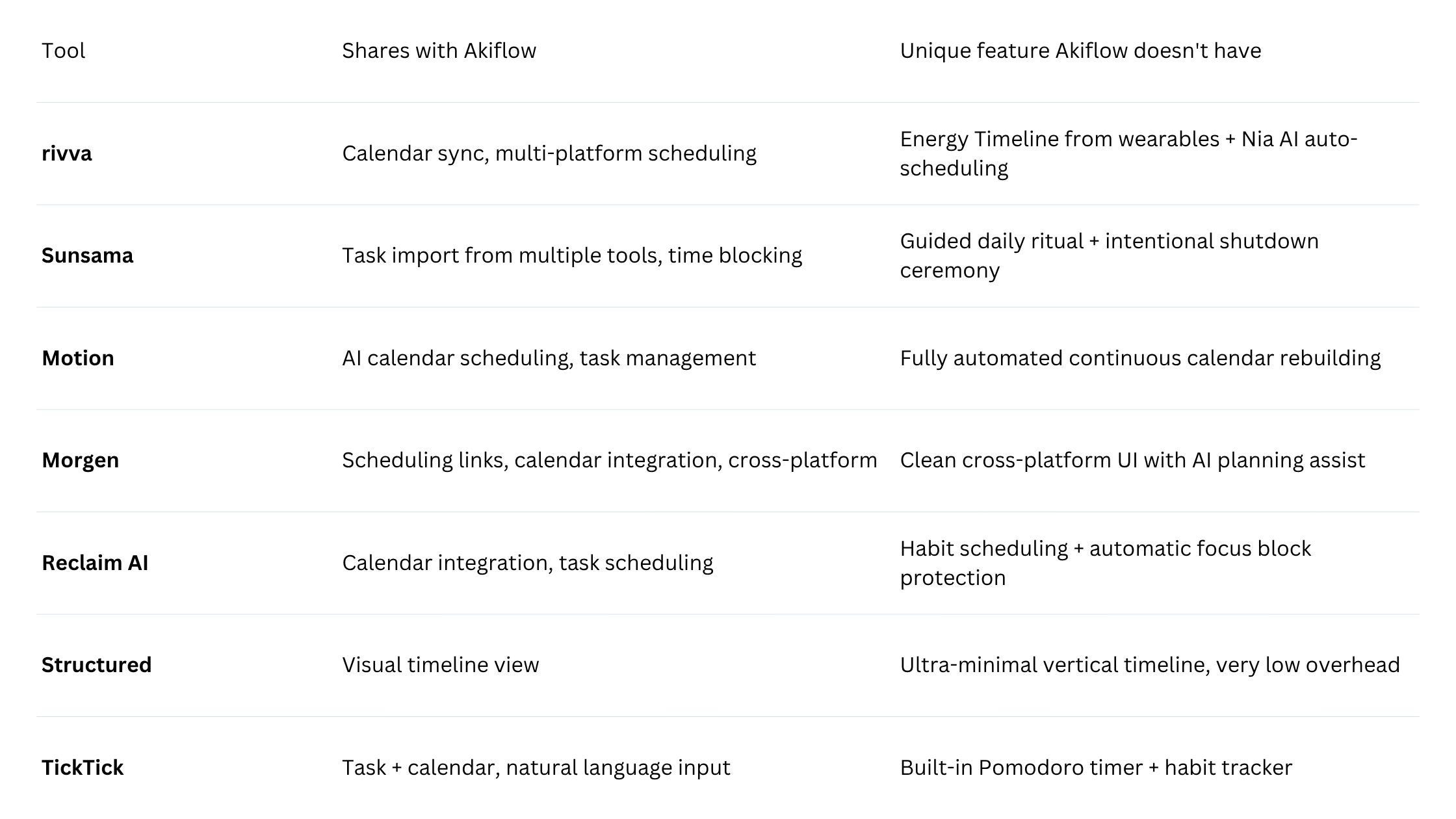
Where Akiflow treats scheduling as a speed problem, rivva treats it as an energy problem. The fundamental question rivva is trying to answer is not “where does this task go?” but “when is the right time for this kind of task, given how this person is actually doing today?”
rivva connects to Apple Watch, Fitbit, Oura, and Whoop to build an Energy Timeline: a daily view that shows cognitive peak windows and recovery dips based on your sleep and recovery data. The AI assistant, Nia, then schedules tasks into those windows automatically.
This is meaningfully more human than Akiflow’s model. Akiflow asks you to be a scheduling expert. rivva asks Nia to be one on your behalf. The difference matters most on days when your executive function is compromised — after a poor night of sleep, during a high-stress period, in the mid-afternoon slump. On those days, a keyboard-first scheduling tool requires exactly the cognitive resources you have least available.
Key features: Energy Timeline from wearable data, Nia AI assistant (text + voice), Smart Scheduling, Scheduling Links, multi-calendar sync, iOS, Android, web.
Pricing: Free tier available. $10/month or $80 per year for premium with a 7-day free trial. Available on iOS, Android, and web.
Pros:
Energy-aware scheduling is a category Akiflow doesn’t compete in at all
Nia’s voice input makes planning accessible across contexts
Lower price point than Akiflow for more automated value
Cons:
Full Energy Timeline functionality requires a wearable
Newer product with a smaller user community
Sunsama
Best for: People who want intentionality in their planning, not just speed.
Sunsama represents the opposite philosophy from Akiflow: Akiflow wants to make manual scheduling as frictionless as possible; Sunsama wants to make planning as intentional as possible. The Sunsama model is built around a daily ritual — a guided morning review where you pull in tasks from integrated tools, estimate time, and build a realistic day.
Pricing: Approximately $20/month.
Motion
Best for: People who want the scheduling decisions removed from their plate entirely.
Motion builds and continuously rebuilds your calendar based on task priorities, deadlines, and available time. The case for Motion over Akiflow comes down to one question: do you want to be a better scheduler, or do you want to stop scheduling? Akiflow optimizes for the first. Motion handles the second.
Pricing: Approximately $19–34/month.
Morgen
Best for: People who want a clean, cross-platform calendar tool with scheduling links and a lighter AI assist.
Morgen is a thoughtful, well-designed cross-platform calendar app. It supports scheduling links, integrates tasks from multiple sources, and includes an AI planning assistant that is lighter-weight than rivva’s Nia but more accessible than a manual tool. Notably more cross-platform than Akiflow — works well on Windows and Linux as well.
Pricing: Free tier available. Pro approximately $9/month.
Reclaim AI
Best for: People who want to protect focus time and build scheduling habits without thinking about it.
Reclaim integrates with your existing calendar and automatically defends focus blocks, habit time, and task slots against meeting creep. For people who use Akiflow primarily to create and defend focus blocks, Reclaim handles that function automatically.
Pricing: Free tier available. Pro approximately $10/month.
Structured
Best for: People who want a simple visual day with minimal cognitive overhead.
Structured does one thing: shows your day as a beautiful vertical timeline, and you populate it by dragging events and tasks into place. No keyboard shortcuts to memorize. No AI to configure. Just a visual timeline that makes the day legible at a glance.
Pricing: Free tier. Pro approximately $3/month.
TickTick
Best for: People who want Akiflow’s cross-tool task management feel at a fraction of the cost.
TickTick does a lot for its price. Natural language input makes adding tasks fast enough to capture ideas before they disappear — which is meaningfully important for distracted brains. “Write the quarterly report Tuesday 2pm for 90 min” just works.
Pricing: Free tier available. Premium approximately $3.99/month.
How to choose
If the manual scheduling was the problem → rivva or Motion.
If the keyboard-first learning curve was the problem → Any of the tools here are more accessible. Sunsama, Morgen, and TickTick all have standard interfaces that deliver value from day one.
If the price felt high for a manual tool → Morgen, TickTick, and Reclaim all offer comparable or greater functionality at lower price points.
If you wanted the “feel more human” quality specifically → rivva’s conversational Nia assistant and Sunsama’s intentional ritual model both foreground the human element of planning in ways that Akiflow’s keyboard-first design explicitly does not.
FAQ
Q: Is rivva’s voice input actually useful, or is it a gimmick?
A: It’s most useful in specific contexts: morning commutes, transitions between tasks, post-meeting decompression. The value is not that voice is inherently better than typing — it’s that voice lowers the activation energy for interacting with the tool on days when executive function is limited.
Q: What is the simplest possible Akiflow alternative?
A: Structured or TickTick. Structured if visual simplicity is the priority. TickTick if you need task management depth alongside a lower-friction interface. Both are available free, both are accessible from day one.
Bottom line
Akiflow is an excellent tool for a specific type of user who values speed, keyboard fluency, and the satisfaction of a well-maintained GTD system. The alternatives above offer meaningfully different approaches: rivva and Sunsama both treat planning as a human activity shaped by fluctuating capacity. Motion removes the burden of planning decisions almost entirely. Morgen, Reclaim, and TickTick offer accessible power at lower cost. Structured offers radical simplicity.
The common thread: they were built for people, not for productivity idealists.