
The Only 5 Akiflow Alternatives Worth Trying in 2026
Tired of Akiflow's manual planning? Here are 5 better alternatives for founders and professionals. Compare Akiflow to Sunsama, Motion, ReclaimAI, rivva, and Routine

If you’ve tried Akiflow (or if you’ve been thinking about trying it) you know the appeal.
Akiflow promises to be the all-in-one productivity tool that finally brings order to chaos. Task consolidation from 18+ apps. Universal inbox. Keyboard shortcuts for power users.
But maybe you also know the frustration: missing features (like subtasks & auto-schedule), unpredictable mobile performance, and a high monthly price that starts to sting when you question the ROI.
You’re not alone. Despite Akiflow’s strengths, users consistently report the same frustrations: manual planning burden, poor mobile experience, lack of intelligent automation, and a price tag that feels steep for what’s essentially a manual coordination tool.
This article is for you if you’re looking for an Akiflow alternative that works. There are a handful of tools out there that match parts of what Akiflow promises, often with trade‑offs that make sense if your priority is clarity, sustainability, or less manual overhead.
I’m going to walk you through five of the most promising Akiflow alternatives in 2026, laying out what they do well, where they stumble, and for which workflows they’re best suited.
Why People Are Looking for Akiflow Alternatives
Akiflow was built for power users who want everything in one place. The pitch is compelling: consolidate tasks from Gmail, Asana, Slack, Linear, Trello, and 15 other tools into a single universal inbox. Add keyboard shortcuts, time blocking, and calendar integration, and you have what looks like the ultimate productivity command center.
For many users, that’s exactly what they got. But for just as many, Akiflow created more problems than it solved.
Manual Planning: Akiflow consolidates your tasks, but it doesn’t tell you when to do them. You still have to decide what’s realistic for today versus tomorrow. There’s no built-in way to plan around your energy levels, focus hours, or cognitive load.
Energy Blindness: Like most productivity tools, Akiflow schedules based on one variable: available time. It doesn’t know that a 30-minute task at 9am (when you’re fresh) is fundamentally different from the same task at 4pm (when you’re running on fumes).
You end up scheduling demanding work during your worst hours, then wondering why you can’t focus.Integration Overload and Stability Issues: Ironically, Akiflow’s biggest selling point (18+ integrations) can become its biggest weakness. Users report sync issues, where tasks completed in Akiflow don’t sync back to source apps. Two-way integration doesn’t always work reliably. And pulling tasks from 18 different sources can create overwhelming, not clarity.
Missing Critical Features: Despite its feature-rich reputation, Akiflow lacks some basics:
No subtasks: Critical for breaking down complex projects
No time component to task deadlines: You can set a due date but not a specific time
Limited project management: The “Projects” section is more organizational than functional
High Monthly Price: If you’re paying for Akiflow’s annual price, the tool might seem affordable at $114/year ($9.5/month). But for users who prefer to pay monthly, Akiflow is expensive ($34/month), especially compared to other tools with similar capabilities. For context, that’s 2-3x more than average task management tools. And many users feel they’re not getting commensurate value.
Quick Comparison: 5 Akiflow Alternatives
Motion
rivva
Sunsama
Reclaim.ai
Routine
Deep Dive: Each Tool Compared
1. Motion: Best for Hands-Off AI Scheduling
What It Is
Motion is an AI-powered productivity platform that automatically schedules your tasks based on deadlines, priorities, and your calendar availability. Unlike Akiflow’s manual approach, Motion uses AI to build and optimize your schedule dozens of times per day, completely automatically.
Key Features
AI auto-scheduling that prioritizes tasks based on deadlines and importance
Automatic rescheduling when plans change
Project management with Kanban and Gantt views
Meeting scheduler (Calendly replacement)
Team workload balancing
Subtask support
Mobile app (iOS and Android)
Integrates with Google Calendar, Outlook, iCloud
Pricing
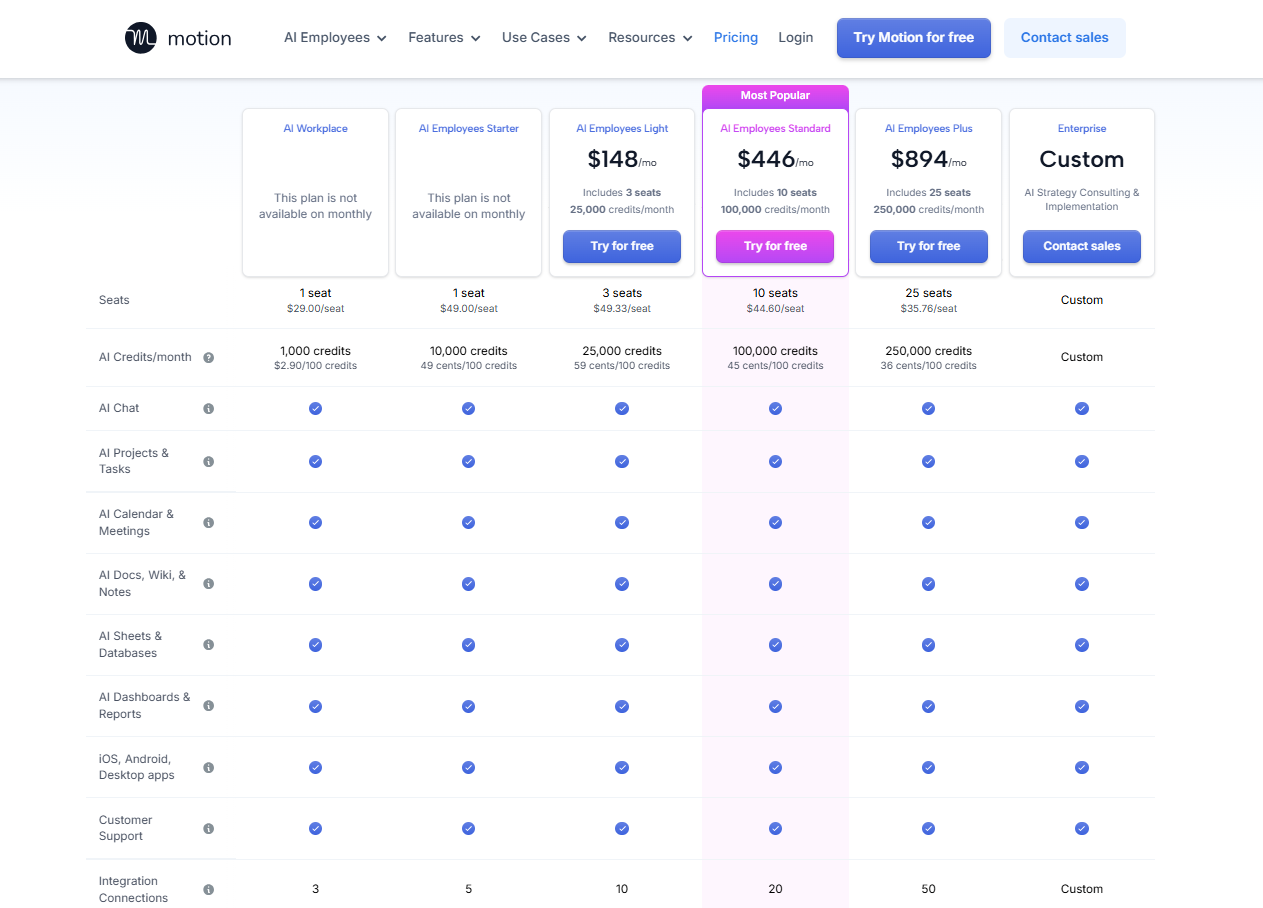
Motion is by far the most expensive tool on this list. It’s 2 cheapest tiers are only available as annual subscriptions. So, if you prefer to pay monthly, the cheapest tier available to you starts at $148/month.
Individual: $348/year ($29/month annual) or $588/year ($49/month monthly)
Team: Starting at $148/month ($1,188/year) for 3 seats
7-day free trial (credit card required)
Pros
Truly hands-off planning. Add tasks and Motion schedules them automatically
Rescheduling is instant and intelligent when priorities shift
All-in-one platform (replaces multiple tools)
Strong project management features with subtasks
Works well for large teams
Cons
Even more expensive than Akiflow
No free tier
Some users report the interface feels overwhelming at first and learning curve is steep
Cannot import existing tasks from other tools
Best For
Busy founders, entrepreneurs, and professionals who want to eliminate manual planning entirely. Perfect if you’re juggling multiple projects and need AI to handle the coordination.
Motion vs. Akiflow
What Motion fixes:
Automatic vs. manual: Motion schedules tasks for you. Akiflow makes you drag them onto your calendar.
Project management: Motion has real PM features (subtasks, Ganban, Gantt). Akiflow’s project features are basic.
Simpler approach: One tool that does everything vs. Akiflow’s approach of consolidating 18 others.
What Akiflow does better:
Lower annual price ($114 vs. $348)
Better task consolidation
Works offline
Who should switch:
If you’re tired of manually planning your day in Akiflow and want AI to handle the coordination, Motion is the obvious alternative. You’ll pay more, but you’ll get actual automation instead of just consolidation.
2. rivva: Best for Capacity-Aware Planning
What It Is
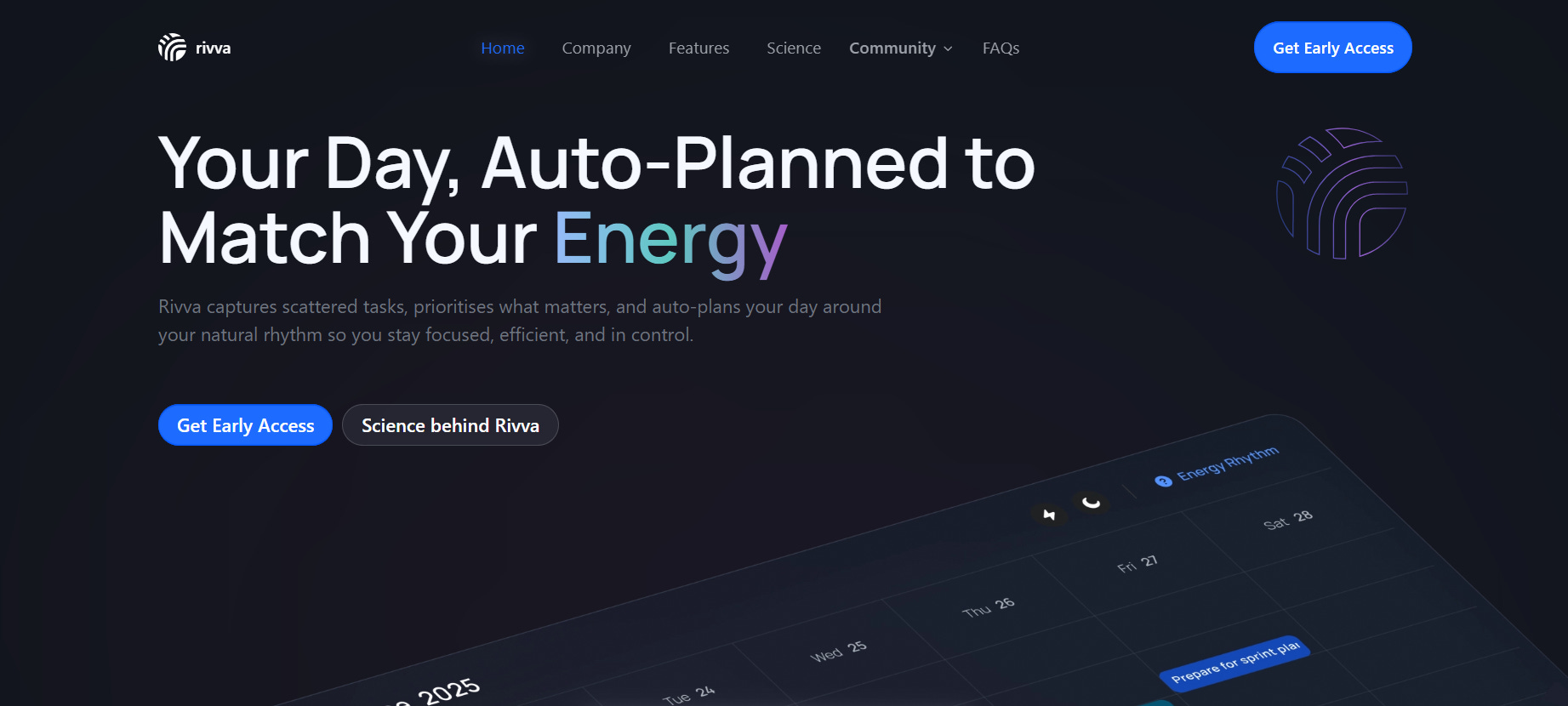
rivva is an intelligent workspace that automatically plans your day based on your calendar, tasks, email, AND sleep patterns. Unlike Akiflow (which schedules based on available time) or Motion (which schedules based on deadlines), rivva schedules based on when you’re naturally sharp, using data from your health app to understand your cognitive capacity.
Key Features
Automatic task extraction from email (meeting summaries, GitHub issues, Notion comments, Linear updates, and more — if it hits your inbox, rivva can extract it)
Connect multiple email addresses (work, personal, side projects)
Two-way Google Calendar sync with time blocking
(Tasks planned in rivva appear on your calendar so people don’t book over them)Multi-calendar support (plan across work, personal, and side projects in one view)
Capacity-aware scheduling (calendar + workload, with energy insights via Apple Health)
Daily planner showing tasks + meetings
Nia, your AI assistant (create, edit, and manage tasks via chat)
Automatic re-planning when meetings or priorities change
Sleep insights and energy timeline
Web app + native iOS app
Pricing
Free tier available. $10/month or $80 per year for premium
7-day free trial.
Available on iOS, Android, and web.
Pros
Only tool that schedules based on sleep and cognitive capacity
Automatic planning reduces decision fatigue (like Motion, but with energy context)
Better mobile experience than Akiflow (native iOS app)
Simpler, less overwhelming (focused integrations)
Automatic task extraction from email (no manual consolidation needed)
Cons
iOS/web only currently (no Android yet)
Fewer direct integrations than Akiflow (but pulls from email notifications)
Best experience requires wearable device (Apple Watch, Oura, etc.)
Best For
Founders, executives, and high-performing professionals who want automatic, capacity-aware planning without Akiflow’s manual burden. Perfect for people with ADHD or high cognitive load who need tools that reduce overwhelm, not add to it.
rivva vs. Akiflow
What rivva fixes:
Automatic vs. manual: rivva auto-schedules like Motion, but adds energy context Akiflow completely ignores
Capacity-aware: Uses sleep data to schedule demanding work during peak hours. Akiflow treats all hours equally.
Better mobile: Native iOS app that works well. Akiflow’s mobile app consistently receives mixed reviews
What Akiflow does better:
More direct integrations (18 vs. rivva’s focused email/calendar approach)
Desktop apps & Android support
More mature product (rivva is in beta)
Who should switch:
If Akiflow’s manual planning exhausts you and the mobile app frustrates you, rivva solves both problems. You get automatic scheduling like Motion, but with intelligence about when you’re actually capable of doing your best work. Plus, task extraction from email means less manual consolidation.
If you don’t have a wearable (Apple Watch, Oura, Whoop), your energy insights might not be as spot-on, but you still get automatic planning, better mobile experience, and AI assistance.
3. Sunsama: Best for Guided Daily Rituals
What It Is
Sunsama is a daily planning tool built around guided rituals for starting and ending your day. If you value calm, intentional workflows and have 15-20 minutes daily for planning, Sunsama’s beautiful interface and structured approach provides clarity without Akiflow’s overwhelming consolidation.
Key Features
Guided daily planning ritual (15-20 minute commitment)
Beautiful, calming UI (consistently praised)
Daily reflection and shutdown routines
Pomodoro timers integrated
Focus mode (mute apps, reduce distractions)
Import tasks from email and 19 integrations
Multi-calendar support
Native mobile apps (iOS and Android)
Pricing

Sunsama doesn’t have a free tier, but they allow a free trial. They have only one paid tier, with the option for a monthly or yearly subscription
Monthly: $20/month
Annual: $192/year ($16/month)
14-day free trial (no credit card required)
Pros
Beautiful, calming interface (prasised as best design in the category)
Structured daily rituals promote intentionality and mindfulness
Better mobile app than Akiflow (native iOS and Android)
Can import from email and 19 tools (similar to Akiflow’s consolidation)
Strong focus mode features reduce distractions
Cross-platform (iOS, Android, Desktop, Web)
Daily reflection encourages learning and improvement
Cons
No AI assistance (completely manual planning)
Requires 15-20 minute daily planning ritual (time commitment)
Expensive at $20/month for a manual tool (common complaint)
No free tier
No energy awareness (schedules based on time only)
Best For
People who have time for structured daily rituals and value beautiful design over automation. Best for calm-paced professionals. Good for those who find Akiflow’s interface cluttered and want something more zen.
Sunsama vs. Akiflow
What Sunsama fixes:
Beautiful design: Clean, calm interface vs. Akiflow’s more utilitarian approach.
Guided structure: Daily rituals provide clarity. Akiflow leaves you to figure out your own system.
Mindful approach: Built for sustainable productivity, not task completion theater.
What Akiflow does better:
More integrations (18 vs. 19, but Akiflow’s are deeper)
Faster task capture (Sunsama’s ritual-based approach is slower)
Lower price on annual ($114 vs. $192)
Who should switch:
If Akiflow’s overwhelming consolidation and poor mobile experience frustrate you, and you want a calmer, more intentional approach to planning, Sunsama is worth trying. Just know you’re trading Akiflow’s keyboard-first speed for Sunsama’s ritual-based mindfulness.
4. Reclaim.ai: Best for Calendar Defense
What It Is
Reclaim.ai is an AI calendar assistant that automatically defends your time for habits, focus work, and personal priorities. Unlike Akiflow (which consolidates tasks) or Motion (which schedules everything), Reclaim focuses on protecting time on your calendar, then you decide what to do with it.
Key Features
Automatic habit scheduling (lunch, exercise, focus time)
Company-wide focus time coordination
Smart 1:1 meeting scheduling
Slack status sync and DND automation
Buffer time management between meetings
Time tracking and analytics
Task management (basic, calendar-centric)
Pricing
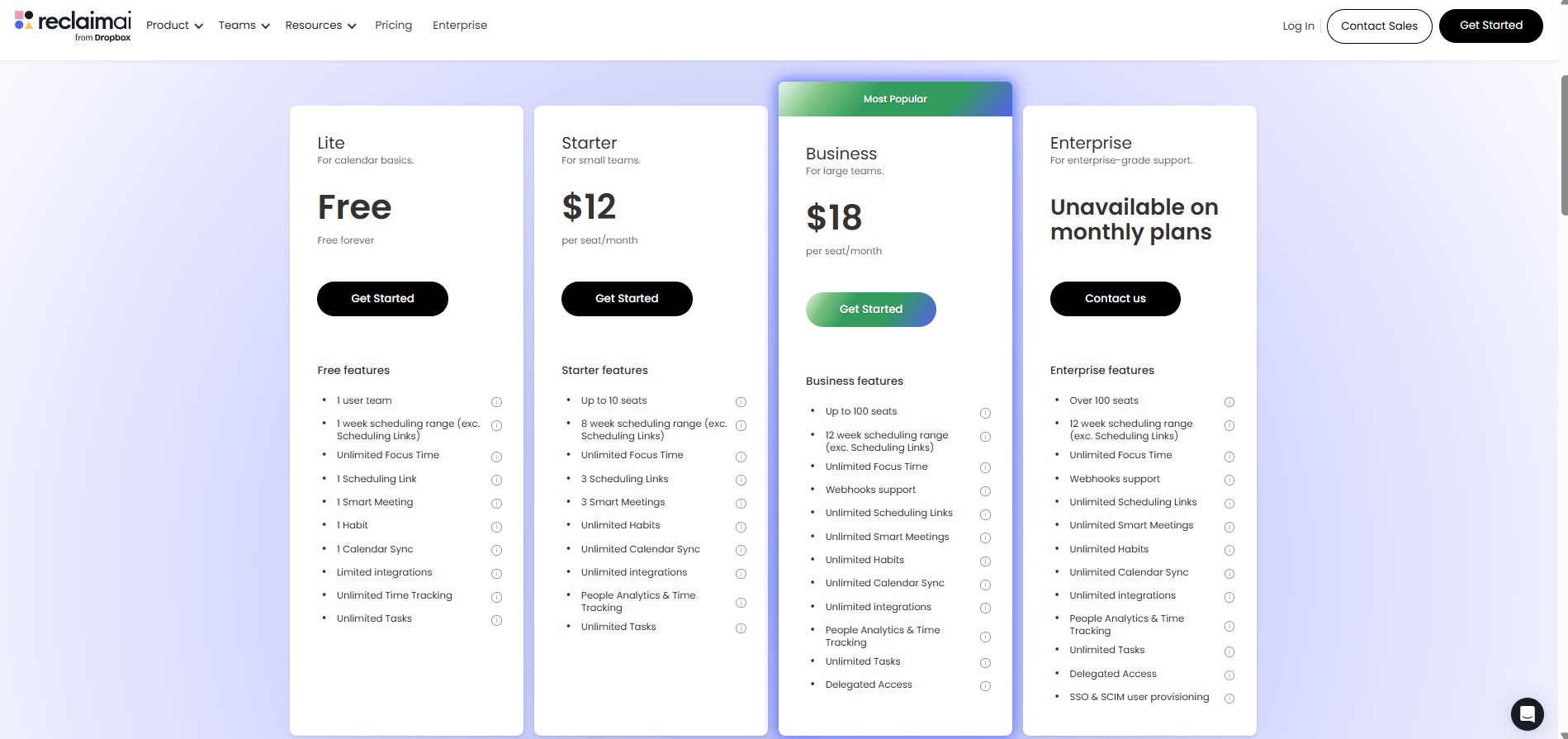
Free
Starter: $144/year ($12/month)
Business: $216/year ($18/month)
Enterprise: Custom pricing
Pros
Free tier available
Excellent habit scheduling (most praised feature)
Strong team features (company-wide focus time)
Automatic Slack integration (status sync, DND)
Popular and well-adopted (created by Dropbox)
Smart meeting scheduling
Good value for teams
Cons
No dedicated mobile app (web-only, mobile-friendly)
No energy awareness (purely time-based like Akiflow)
No AI assistant or conversational help
Task management is basic and calendar-centric
Increasingly team/enterprise-focused
Cannot schedule tasks across midnight (problem for night workers)
Some users report invasive calendar notifications
Best For
Teams and enterprises that need coordinated focus time and calendar management. Companies wanting to protect deep work across the organization. Good budget option if you already have a task manager you love (Todoist, Asana) and just need calendar intelligence.
ReclaimAI vs. Akiflow
What Reclaim.ai fixes:
Free tier: Reclaim offers functional free option. Akiflow has no free tier.
Team features: Better coordination for companies. Akiflow is individual-focused.
Calendar defense: Automatic time blocking for habits and focus. Akiflow requires manual setup.
Lower cost: Cheaper than Akiflow for individuals ($14/month vs $39/month)
What Akiflow does better:
Task management (Reclaim’s is basic)
More integrations for task consolidation (18 vs. Reclaim’s calendar focus)
Desktop apps (Reclaim is web-only)
Who should switch:
If you’re frustrated with Akiflow’s lack of automatic time blocking and you already have a task manager you like, Reclaim.ai adds intelligent calendar defense without requiring you to change your entire workflow. The free tier makes it easy to try without commitment.
5. Routine: Best for Keyboard-First Planning
What It Is
Routine is a fast, minimalist productivity tool built for keyboard-first workflows. Think of it as a lighter, more focused alternative to Akiflow—consolidating tasks and calendar without the overwhelming feature count or price tag.
Key Features
Keyboard-first interface with extensive shortcuts
Task consolidation from multiple sources
Calendar integration
Quick capture from anywhere
Time blocking
Notes and knowledge management
Command bar for fast actions
Free tier available
Pricing

Free tier: Available with core features
Professional: $12/seat/month
Business: $18/seat/month
Pros
Free tier available (unlike Akiflow)
Fast, minimalist interface (less overwhelming than Akiflow)
Offline-first
Quick capture works well
Lightweight approach reduces cognitive load
Good for individuals who want simplicity
Cons
Fewer integrations than Akiflow
Less mature product (smaller team, fewer features)
Limited team features
Not as comprehensive as other alternatives
Smaller user community (less support resources)
Best For
Power users who love keyboard shortcuts but find Akiflow too expensive or overwhelming. Good for individuals who want fast task capture and calendar integration without paying for features they won’t use.
Routine vs. Akiflow
What Routine fixes:
Free tier: Try before you buy. Akiflow requires payment after 7 days.
Simpler: Fewer features means less complexity and cognitive load.
What Akiflow does better:
More integrations (18 vs. Routine’s limited set)
More mature product with larger user base
Better team features
More comprehensive task management
Who should switch:
If you love Akiflow’s keyboard-first approach but want something simpler and cheaper, Routine is worth trying. The free tier removes the risk, and the minimalist design might actually improve your focus compared to Akiflow’s feature density.
How to Choose the Right Akiflow Alternative
Choosing isn’t about finding the “best” tool. It’s about finding the right fit for your specific frustrations with Akiflow.
If Your Main Problem with Akiflow Is...
Manual planning burden
→ Try Motion or rivva (both auto-schedule automatically)
Poor mobile experience
→ Try Sunsama or rivva (both have native mobile apps that work)
No energy awareness
→ Try rivva (only tool that considers sleep & cognitive capacity)
Too expensive
→ Try Reclaim.ai or Routine (both have free tiers)
Integration overload creating overwhelm
→ Try Sunsama or rivva (fewer integrations, more focused)
Missing project management features
→ Try Motion (has real PM with subtasks and project views)
Want keyboard shortcuts without the price
→ Try Routine (similar power user feel, free tier available)
Conclusion
Akiflow pioneered task consolidation and keyboard-first productivity for power users. For some, it’s exactly what they need. But its manual planning burden, poor mobile experience, and lack of intelligent automation drive many users to seek alternatives.
The best replacement depends on what frustrated you most. But if you’re tired of manually planning your day and want a tool that understands your capacity (not just your calendar), rivva offers automatic, energy-aware planning that reduces cognitive overload instead of adding to it.