
AI Calendar vs Time Blocking: Which Really Works in 2026?
Both promise to fix your schedule. One fills your day with blocks. The other learns how your day actually goes and adjusts in real time.

Both approaches promise the same thing: a day that goes the way it’s supposed to. Time blocking says the solution is intention — decide in advance what you’ll work on and when, and protect that commitment from interruption. AI scheduling says the solution is automation — give the algorithm your tasks and deadlines, and let it build and maintain the schedule for you.
The reason people keep searching for a better answer is that neither approach fully delivers on its promise for most people. Time blocking works beautifully in theory and collapses under the pressure of a real week. AI scheduling fixes some of those problems but introduces new ones: a calendar that rebuilds itself automatically can feel like it’s running your day rather than supporting it, and most AI scheduling tools still don’t know anything about how you’re actually feeling.
What is time blocking?
Time blocking is a scheduling method where you assign specific tasks to specific time slots on your calendar rather than working from a to-do list. Instead of a list that says “write quarterly report, review designs, respond to emails,” your calendar has 9am–11am blocked for the quarterly report, 11am–12pm for design review.
The core idea is that a task without a time assigned to it is just a wish. Time blocking converts wishes into commitments.
It works well when:
You have long uninterrupted stretches of available time
Your work requires sustained concentration and benefits from batching
You’re disciplined about protecting the blocks from interruption
Your schedule is relatively predictable from day to day
You’re good at estimating how long tasks take
What is an AI calendar?
“AI calendar” covers a wider range of products than the label suggests. At one end, it means a traditional calendar with a natural language parser added. At the other end, it means a scheduling system that autonomously builds and rebuilds your daily plan based on your tasks, deadlines, calendar commitments, and observed patterns.
Most AI calendars in 2026 sit somewhere in the middle. What most AI calendars don’t know is how you feel. They don’t know you slept five hours last night. They schedule into available time, not into appropriate time.
Where time blocking fails
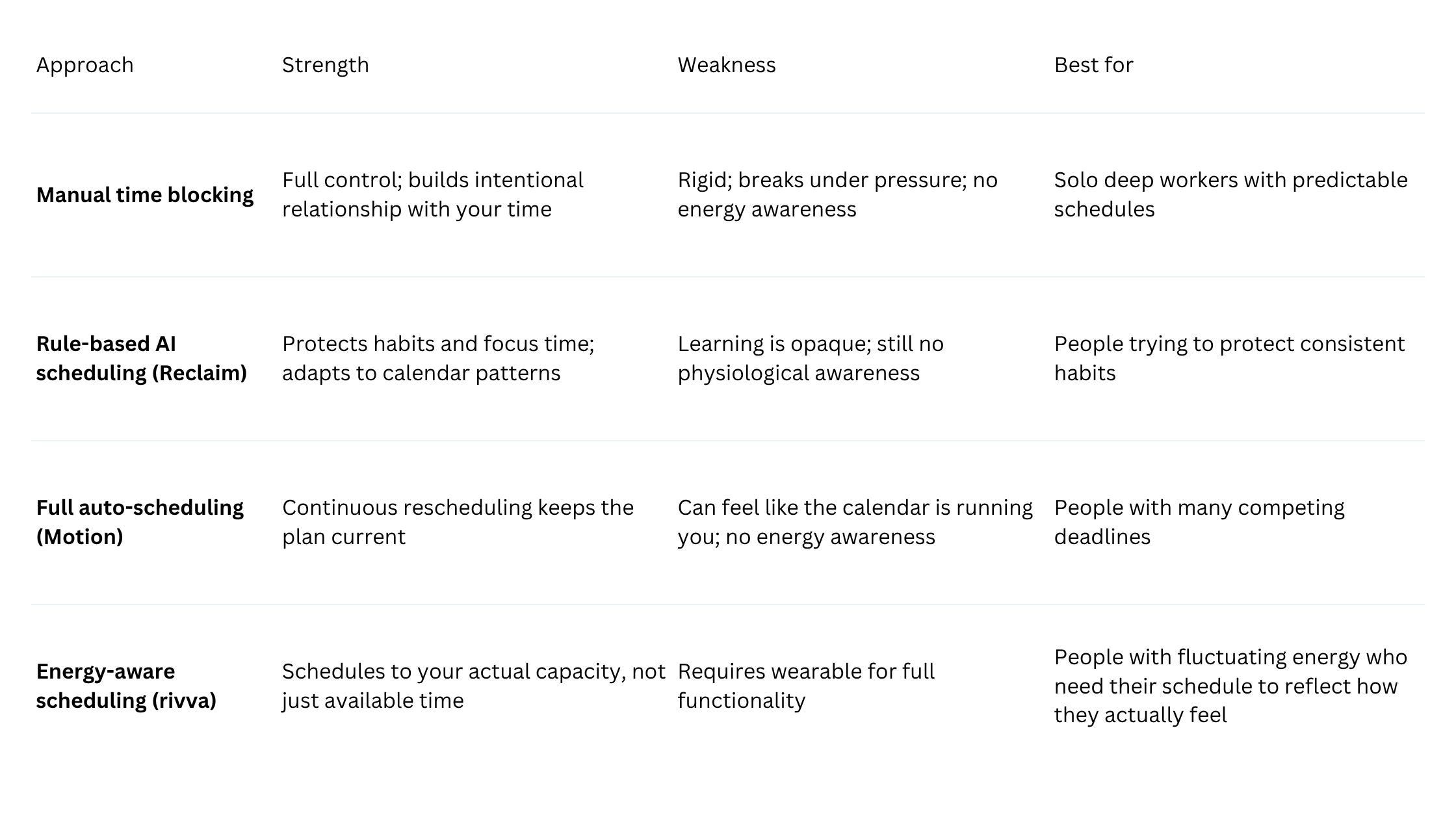
Rigidity under pressure. A time-blocked schedule assumes the rest of the world will cooperate. A meeting runs 20 minutes over. A Slack message requires an hour’s attention. Any of these breaks the schedule, and when the schedule breaks, many people abandon it entirely.
No energy awareness. Time blocking assigns work to clock time without asking whether you’re suited to that work at that hour.
Estimation errors compound. Most people are poor at estimating how long complex cognitive work takes. A series of underestimated tasks cascades into an overfull day.
Guilt when it breaks. When a time-blocked day goes wrong, many people feel like they’ve failed a system that should have helped them. This is especially pronounced for people with ADHD or anxiety.
Static plans in a dynamic world. A time-blocked schedule made on Sunday doesn’t know about the priority shift on Monday morning.
Where AI calendars fall short
Black-box logic. When your AI calendar builds a schedule, it may not be obvious why a particular task was placed at 3pm rather than 10am.
Over-automation. Some AI scheduling tools are aggressive enough that your calendar starts feeling like something that happens to you rather than something you create.
Deadline orientation without energy awareness. Most AI calendars are built around one primary question: what needs to happen by when, and when is there time for it? They don’t include: does this person have the cognitive capacity for this task right now?
Doesn’t account for things you don’t put in the calendar. The cognitive load you’re carrying from a hard conversation, the low-grade anxiety that makes deep work harder, the fact that you didn’t sleep well — none of that is in the system.
Quick comparison
The case for energy-aware scheduling
The fundamental assumption shared by both manual time blocking and AI scheduling is that time is the primary constraint. But for people whose capacity genuinely fluctuates — whose cognitive peaks and dips shift depending on sleep, stress, recovery — time available is only half the equation. The other half is whether you’re suited to the work when you’re scheduled to do it.
Energy-aware scheduling treats that second half as equally important. It doesn’t ask only “when are you free?” It asks “when are you ready?”
rivva builds that answer from wearable data. Each morning, after reading sleep quality, recovery scores, and HRV from Apple Watch, Fitbit, Oura, or Whoop, it generates an Energy Timeline: a visual representation of your likely cognitive peaks and dips throughout the day. Smart Scheduling then places tasks into that timeline with the energy layer as a primary input.
This changes daily because your recovery data changes daily. A Monday morning after a well-rested weekend looks different from a Friday morning after four nights of broken sleep. The schedule adapts to the person who actually showed up.
Nia, rivva’s AI assistant, makes this system conversational. When your energy dips mid-afternoon and you can’t decide what to work on, you ask Nia. She looks at your current energy state, your remaining tasks, and the time available, and tells you what makes sense.
Which should you use?
Choose manual time blocking if:
You do primarily solo, deep-focus work with predictable schedules
You value having complete visibility and control over your time
You find the act of planning itself useful for thinking through priorities
Choose rule-based AI scheduling (like Reclaim) if:
Your primary challenge is protecting focus time and consistent habits
You want AI assistance without full automation
You want a free or low-cost option
Choose full auto-scheduling (like Motion) if:
You have many competing tasks and deadlines that require constant reprioritisation
You want the scheduling problem taken off your plate as completely as possible
Choose energy-aware scheduling (like rivva) if:
Your energy and cognitive capacity fluctuate meaningfully from day to day
You’ve noticed that when and how you do work matters as much as whether you do it
You wear a device that tracks sleep and recovery and want to put that data to use
You struggle with task paralysis at low-energy moments
FAQ
Is time blocking still worth doing in 2026?
Yes, for the right person and workflow. Its limitations are real, but so are its benefits when the conditions are right.
What’s the difference between AI scheduling and energy-aware scheduling?
Most AI scheduling tools use time availability and deadline proximity as their primary inputs. Energy-aware scheduling adds physiological data — sleep quality, recovery scores, HRV from wearables — meaning the schedule reflects not just when you’re free but when you’re suited to the work.
What if my energy levels aren’t consistent — can AI scheduling handle that?
That’s precisely what energy-aware scheduling is designed for. rivva’s Energy Timeline is rebuilt each morning based on the previous night’s recovery data, so a low-energy day produces a genuinely different schedule than a high-energy one.
Bottom line
Time blocking and AI scheduling aren’t competing answers to the same question. Time blocking asks: how do I protect my time? AI scheduling asks: how do I make sure my tasks get done? Energy-aware scheduling asks something different from both: how do I make sure the right work happens at the right moment, given how I actually feel?
For most people, that third question is the one that actually determines whether a productive day happens or not. Adding the energy layer doesn’t replace the logic of time blocking or AI scheduling — it grounds that logic in something more honest: the person, not just the plan.