
AI Assistant for ADHD: What to Look for in 2026
Not all AI assistants work for ADHD brains. The right one reduces decisions, not just tasks, and handles the gap between what you planned and what you could actually do.

The promise of AI assistants for productivity is compelling: offload the cognitive overhead of managing your schedule, get intelligent reminders, let the AI figure out when to do what. For people with ADHD, who carry a disproportionate cognitive load just from managing attention, transitions, and time, this sounds particularly useful.
The reality is more complicated. Most AI assistants available today were built for neurotypical workflows. They don’t know what to do with variable energy, task paralysis, or the specific way that ADHD turns “I have seven things to do today” into “I have done none of them and it’s 4pm.”
There’s also the irony that many AI assistants, in trying to be helpful, add decisions. They surface options. They ask for input. They require configuration. For an ADHD brain where decision-making is already costly, an assistant that presents more choices before completing a task isn’t help — it’s friction in new clothing.
What Makes an AI Assistant Actually ADHD-Friendly?
It Reduces Decisions, Not Just Tasks
An AI that takes a task and breaks it into five sub-tasks with options for how to approach each one has not reduced your cognitive load — it has reorganized it. An AI that says “here’s your next action, at this time, in this window” and doesn’t ask you to choose between equally valid approaches is actually useful.
It Adapts to Your Actual Capacity, Not Your Planned Capacity
An AI assistant that only knows about your plan has no way to help you recover from the gap between plan and reality. One that knows about your actual capacity — how you slept, what your heart rate variability looks like, how recovered you actually are — can adjust the plan before you fail it.
Low Friction to Re-Enter After a Bad Day
Friction-free re-entry means: open the app, see what’s most important right now, and get a clear signal about what to do next. No guilt trip. No rebuilding. No reviewing all the things you didn’t do.
Voice Input Available
On a low-capacity day, pulling out your phone, opening an app, and typing a task requires initiating a whole chain of actions. Voice input removes several links from that chain. Speaking something aloud requires less executive activation. For ADHD, this isn’t a nice-to-have feature; it’s the difference between capturing a thought before it disappears and losing it.
It Doesn’t Require Daily Maintenance to Stay Useful
The very days when maintenance is hardest are the days when you most need the tool to work. An ADHD-friendly AI assistant should be useful even after days of neglect.
Transparent About Why It’s Doing What It’s Doing
Knowing that Nia scheduled your difficult work at 10am because your sleep data showed you’re in a cognitive peak today is different from seeing 10am blocked off with no explanation. Transparency also teaches you your own patterns.
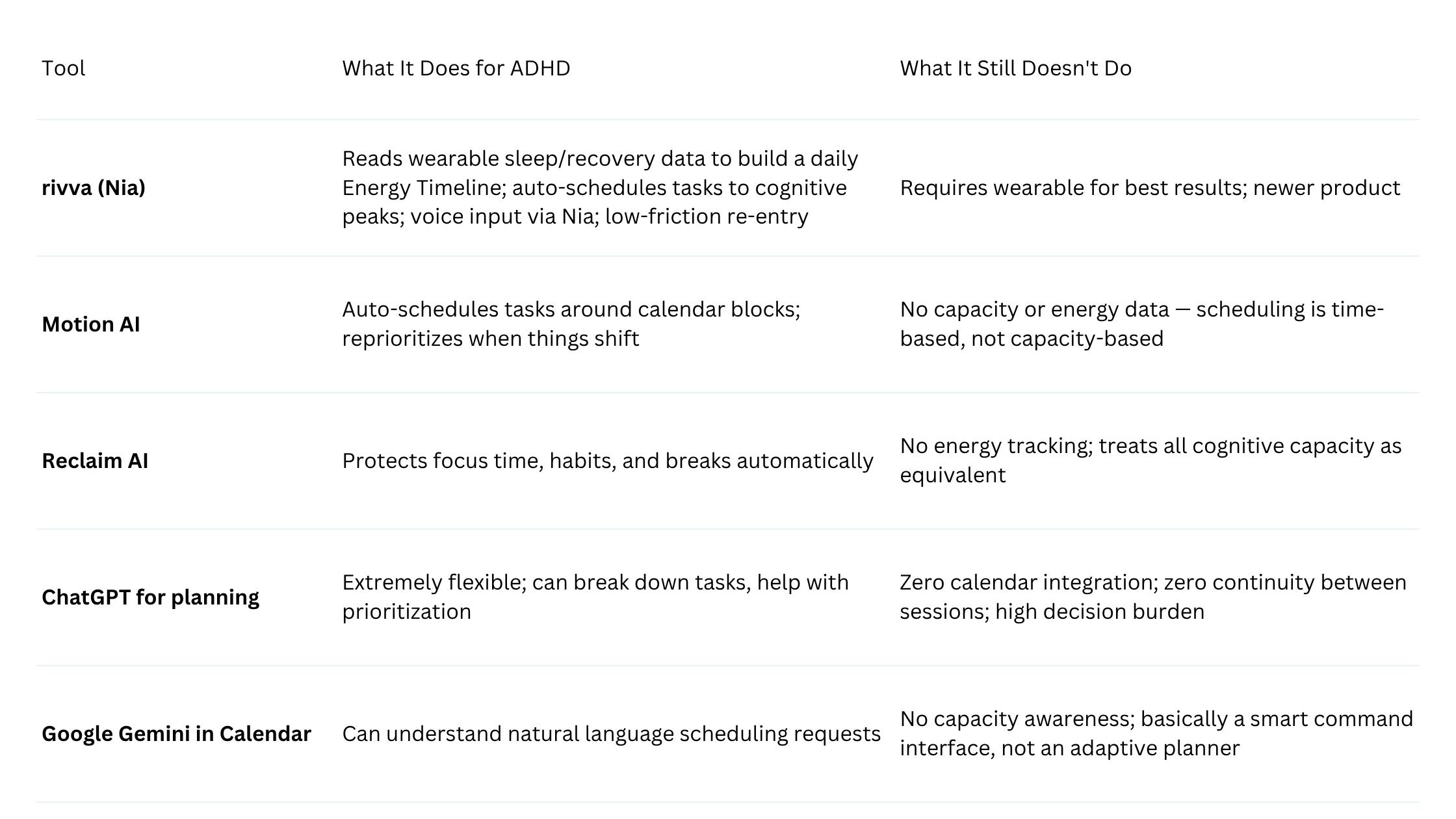
Comparison: How Current AI Tools Perform for ADHD
The ADHD-Specific Failure Modes of Current AI Tools
They optimize for time, not energy. The dominant model in AI scheduling is time-based optimization. It doesn’t know whether you’re in a cognitive peak or a post-lunch dip, whether you slept well, or whether you’re in a dysregulation spiral.
They don’t model the bad day. When you don’t follow the plan, most AI tools respond by rescheduling. They don’t ask why you didn’t do the work, and they don’t adjust the difficulty or type of work based on patterns they’ve noticed.
They require too much input to be useful on low-capacity days. Setting up Motion requires thinking through priorities, time estimates, and deadlines. ChatGPT needs you to provide context every single session. The barrier to entry on any of these tools is highest on the days when the help is most needed.
What Nia (rivva’s AI) Does Differently
Nia is the AI assistant inside rivva, accessible via text and voice. When you connect a wearable (Apple Watch, Oura, Fitbit, or Whoop), rivva receives sleep stage data, heart rate variability, and recovery scores. From this, it constructs an Energy Timeline — a visual map of your expected cognitive peaks and dips for the day. Nia uses this timeline to schedule tasks. Hard work goes in peaks. Administrative tasks go in dips.
The result is a schedule derived from how you actually are today, not from how you were when you built the plan last Sunday evening. When you tell Nia “I have this report to finish and these three emails to send,” it doesn’t ask you when you want to do them — it slots them into the day based on the cognitive demands of each task relative to your available energy.
This also affects re-entry. If you open rivva after a morning that went sideways, Nia doesn’t present you with a graveyard of missed blocks. It shows you where your energy is now, what’s still available today, and what the adjusted plan looks like.
Nia is also accessible by voice. On a day when task initiation is difficult, voice access to your planner removes a meaningful friction point.
How to Evaluate Any AI Assistant for ADHD
What happens on a bad day? Open the app at 3pm, having done nothing on your task list since 9am. What does it show you? Does it show you everything you missed? Or does it tell you what to do right now?
Does it require maintenance to stay accurate? Deliberately stop using the tool for two or three days. Come back. Is it still usable?
Where does the decision-making actually end? Count the number of choices you’re asked to make before the tool gives you a concrete next action.
Does it know anything about your capacity, or only your calendar? If all the tool knows about you is what’s in your calendar, it can tell you when you’re free. It cannot tell you when you’re actually available in a cognitively meaningful sense.
Can you use it when executive function is low? Try using the tool on a day when you’re feeling depleted. Is the interface navigable? Can you get to a useful action with one or two steps?
FAQ
Q: Is there any AI assistant specifically designed for ADHD?
rivva is the closest to explicitly designed for the specific challenges of ADHD — variable energy, time blindness, re-entry friction, capacity-based scheduling. Most other tools were built for general productivity with features that happen to be useful for ADHD.
Q: Can I use ChatGPT as my ADHD planning assistant?
ChatGPT can be useful for specific planning tasks — breaking down a project, brainstorming priorities. But as a daily planner for ADHD, it has fundamental limitations: no calendar integration, no continuity across sessions, and a high-input requirement. It works best as a thinking partner for specific problems, not as a daily planning system.
Q: Does using a wearable make a meaningful difference?
For energy-aware scheduling, yes. Wearables provide objective data about sleep quality, recovery, and physiological readiness that you can’t reliably track manually. If you already own a supported wearable, connecting it adds real value.
Bottom Line
Most AI assistants are not built for ADHD. They’re built for people who can initiate tasks reliably and have roughly consistent cognitive capacity. Those are not the problems that most define ADHD.
The right AI assistant for ADHD reduces decisions rather than rearranging them, adapts to how you actually are rather than how you planned to be, and makes it easy to come back after the plan breaks — which it will, because all plans for ADHD brains eventually do.
rivva is the closest current implementation of those principles. No tool solves the underlying executive function challenges. But it’s building toward the right problem. That’s worth more than a more polished tool solving the wrong one.