
9 Time Blocking Calendars That Work With ADHD Brains
Standard time blocking breaks down when your energy doesn't cooperate. These tools are built for that reality.

Time blocking is one of the most recommended productivity techniques for people with ADHD. Therapists recommend it. Coaches recommend it. Every productivity article recommends it. And for many people with ADHD, it doesn’t work — not because they’re doing it wrong, but because time blocking, as it’s usually described, assumes things about how a brain works that aren’t true for them.
What to look for in a time blocking calendar for ADHD
Visual time representation. ADHD brains often struggle with time as an abstraction. Tools that show duration visually help bridge that gap.
Low planning friction. The more steps required to build a plan, the more likely planning will become procrastination.
Flexibility without guilt. Plans fall apart. A good ADHD-compatible tool makes replanning easy.
Task initiation support. Knowing what to do and being able to start it are different problems.
Energy and capacity awareness. Variable energy is a consistent experience for many people with ADHD.
Transition support. Moving from one task to another is often harder than the tasks themselves.
Quick comparison
Why standard time blocking fails ADHD brains
Time blindness. A task scheduled for Thursday doesn’t generate urgency until you’re suddenly inside it — often unprepared.
Variable energy. ADHD executive function doesn’t run on a consistent baseline. A plan built on Monday’s energy may be completely unrealistic by Wednesday afternoon.
Task paralysis. The gap between “the calendar says I should work” and “I’m actually working” is where time blocking plans most commonly fail.
Guilt spirals. When a time blocking plan fails, it creates evidence that you can’t stick to a schedule. The tool becomes associated with failure.
Planning as procrastination. Some people with ADHD spend more time restructuring their schedule than doing the work.
Detailed tool breakdowns
1. rivva
Best for: People with ADHD who also track sleep or recovery data and want their schedule to respond to how they actually feel each day.
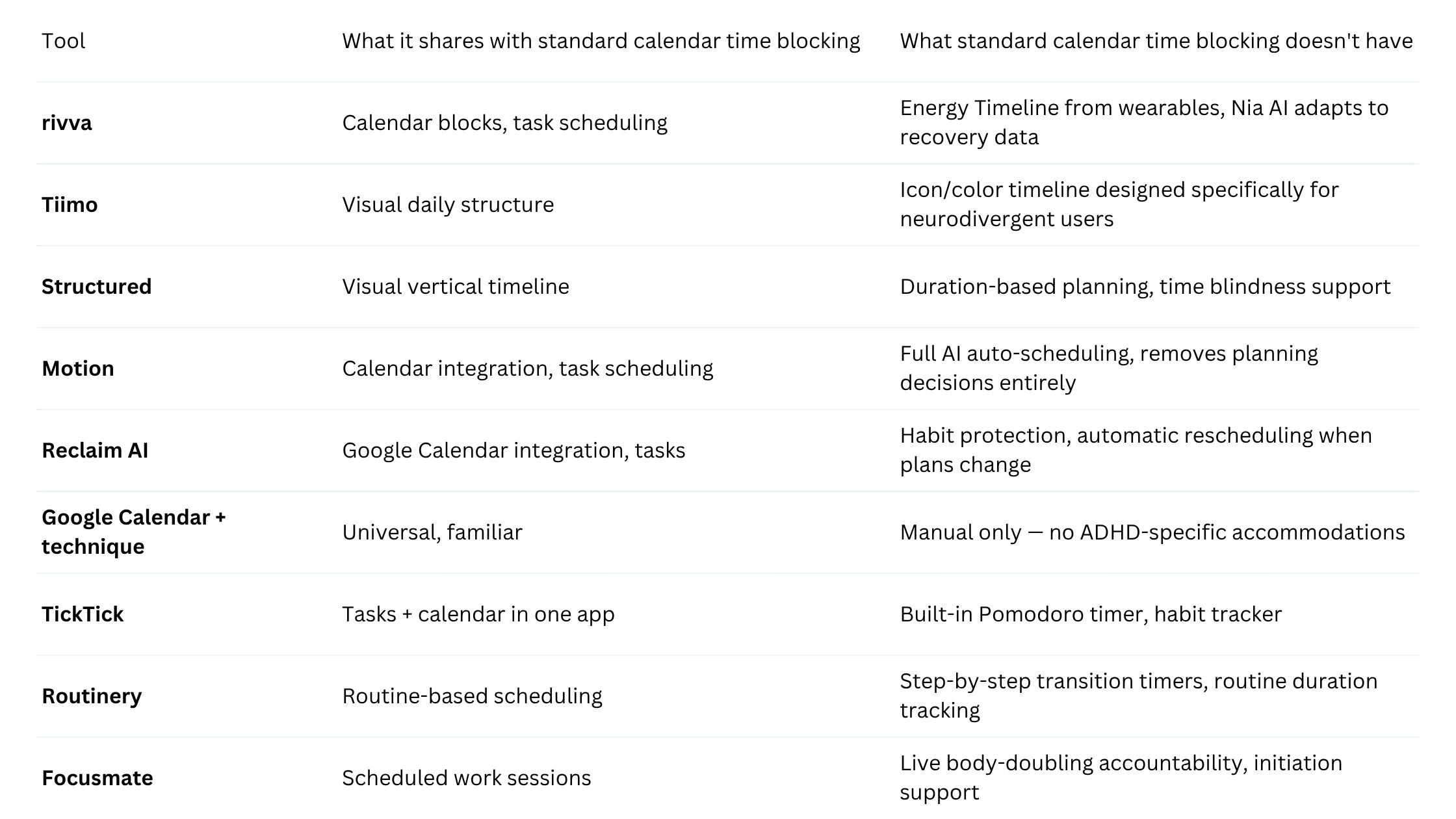
rivva connects to wearables — Apple Watch, Fitbit, Oura, Whoop — and reads sleep quality and recovery data overnight. It then builds an Energy Timeline: a visual map of where your cognitive peaks and dips are likely to fall throughout the day. Nia, rivva’s AI assistant (text and voice), uses that timeline to schedule your most demanding tasks into peak windows and lighter work into low-energy periods.
For ADHD specifically, this addresses the variable energy problem directly. You’re not building a schedule based on what you think your Tuesday should look like — you’re building it based on physiological data about how your Tuesday is likely to actually go.
The voice interface matters here too. When task initiation is hard, being able to say “Nia, what should I work on now?” removes several steps from that process.
Pricing: 7-day free trial, then $10/month or $80 per year.
2. Tiimo
Best for: People with ADHD, autism, or other neurodivergent experiences who need a visual daily structure with low cognitive overhead.
Tiimo was built specifically for neurodivergent users. Its daily timeline uses icons, colors, and visual blocks to represent tasks rather than text-heavy lists. Transitions are built into the interface.
Pricing: Plans start around $5/month.
3. Structured
Best for: People who struggle with time blindness and need to see their day as a clear, visual vertical timeline.
Structured’s core interface is a vertical timeline where tasks have visual length proportional to their duration. Duration becomes visible, not just labeled.
Pricing: Free tier available. Pro plan approximately $4/month.
4. Motion
Best for: People who want to eliminate the planning decision entirely.
Motion removes the planning step almost entirely: you add tasks with deadlines and priorities; Motion automatically builds your schedule. For ADHD, eliminating planning decisions is a meaningful benefit.
Pricing: Plans start around $19/month.
5. Reclaim AI
Best for: Google Calendar users who want their habits and focus time protected automatically.
Reclaim’s value proposition for ADHD is specific: it defends the time you’ve already committed to. Exercise habit at noon? Reclaim moves it around meetings rather than letting it disappear.
Pricing: Free tier available. Paid plans start around $10/month.
6. Google Calendar + time blocking technique
Best for: People who want to start time blocking without any new tools.
Standard Google Calendar can be used for time blocking by treating it as a scheduling layer: every significant task gets a calendar event. Zero additional cost or learning curve.
Pricing: Free.
7. TickTick
Best for: People who want tasks, calendar, and Pomodoro timer in one app.
TickTick’s built-in Pomodoro timer turns a vague block of “work time” into a series of concrete, bounded intervals — creating urgency without making the stakes feel high.
Pricing: Free tier available. Premium around $28/year.
8. Routinery
Best for: People who struggle with transitions, morning routines, or the space between tasks.
Routinery is a routine timer. You build sequences of tasks and Routinery guides you through each step with timers and visual progress. For ADHD, transitions are often harder than the tasks themselves.
Pricing: Free tier available. Premium around $4/month.
9. Focusmate
Best for: People who struggle with task initiation and need external accountability.
Focusmate is body doubling as a service. You book a video session with a partner, each share what you’re working on, work in silence, then check back in. Body doubling works because human presence activates the social attention system in a way that sitting alone doesn’t.
Pricing: Free tier (3 sessions/week). Pro plan around $10/month.
How to choose
Variable energy → rivva (physiological data-based scheduling)
Time blindness and visual planning → Structured or Tiimo
Planning overhead and decision fatigue → Motion’s auto-scheduling or Reclaim AI’s habit protection
Task initiation → Focusmate’s body doubling or Routinery’s transition support
Start without spending money → Google Calendar, TickTick’s free tier, Focusmate’s free tier, or Structured’s free tier
FAQ
Why does regular time blocking fail for people with ADHD?
Several specific mechanisms interact: time blindness makes future blocks feel theoretical; variable energy means plans built during high-capacity moments aren’t executable during low-capacity ones; task initiation difficulty creates a gap between intention and action; and guilt from missed blocks accumulates.
What’s the best free ADHD-friendly scheduling app?
For pure time blocking, Structured’s free tier is one of the most ADHD-compatible options. Google Calendar with intentional time blocking is free and sufficient for people who need structure more than sophistication.
Is energy-aware scheduling different from regular AI scheduling?
Yes, meaningfully so. Standard AI scheduling places tasks based on priority, estimated duration, and calendar availability. Energy-aware scheduling — like rivva’s approach — also factors in physiological data: how well you slept, your recovery score from a wearable, the pattern of cognitive peaks and dips.
Bottom line
Standard time blocking advice wasn’t designed for brains that experience time blindness, fluctuating energy, or task initiation difficulty. rivva addresses the energy variability problem using physiological data from wearables. Tiimo and Structured address the visual processing problem. Motion and Reclaim AI reduce planning overhead. Routinery and Focusmate target initiation and transitions specifically.