
8 Best Clockwise Alternatives in 2026
Clockwise closed in March 2026. Here are the AI scheduling tools that pick up where it left off, including one that adapts to your energy, not just your calendar.

If you relied on Clockwise to protect your focus time and automatically shuffle meetings around your deep work blocks, you already felt the gap the moment it shut down. Clockwise was one of the first AI calendar tools that genuinely understood context — it didn’t just add events, it rearranged your day to give you longer stretches of uninterrupted time. For a lot of people, losing it meant going back to a calendar that just sits there, passive, doing absolutely nothing to help you think.
This article is for anyone who used Clockwise and is now figuring out what comes next. It’s also for anyone who was considering it, or who has been manually block-scheduling their week every Sunday night and suspects there must be a better way. We’re covering eight tools — what they actually do, who they’re built for, and where they fall short.
One note upfront: rivva (that’s us) is on this list, and we’re obviously going to describe it most enthusiastically. But we’ve tried to be honest about the whole field. Choosing the wrong planning tool is genuinely costly — in setup time, subscription fees, and the frustration of a system that doesn’t quite fit how you work.
What made Clockwise useful — and what to replace it with
Clockwise did two things really well. First, it automatically protected focus time by moving flexible meetings around to create longer blocks of uninterrupted work. Second, it was smart about teams — it could coordinate everyone’s “flexible” time to find meeting windows that minimized the damage to everyone’s deep work.
What it didn’t do: it had no awareness of how you were actually feeling on any given day. It treated every Tuesday morning the same as every Friday afternoon. If you slept four hours and your capacity was shot, Clockwise would still cheerfully schedule your hardest task during what it calculated as your “focus time.” That’s the gap the next generation of tools is starting to fill.
When you’re evaluating replacements, the question isn’t just “will it protect my calendar?” It’s “will it help me work in a way that accounts for fluctuating capacity?” Some of the tools below are direct functional replacements for what Clockwise did. Others go further. Knowing what you actually need will help you pick the right one.
What to look for in a Clockwise alternative
1. Auto-scheduling that actually moves things
The baseline: the tool should place tasks in your calendar automatically, not just suggest time slots for you to manually drag in. Clockwise auto-scheduled. Your replacement should too.
2. Calendar sync that doesn’t break
Multi-calendar support — Google, Outlook, iCloud — sounds like a given, but plenty of tools still fumble this. If you have a work calendar and a personal calendar, you need a tool that treats both as real and doesn’t double-book you.
3. Some awareness of your energy or capacity
This is where things get interesting. A few tools now pull from sleep and wearable data to model your cognitive energy across the day. If you’re prone to task paralysis, overwhelm, or just have genuinely variable days, a tool with energy awareness will serve you significantly better than one that just fills calendar slots.
4. Scheduling links
Clockwise had a simple “links” feature so people could book time with you without the email back-and-forth. Any serious replacement should have something equivalent.
5. A friction-appropriate interface
“Friction-appropriate” means: the interface should match how much you want to think about your schedule. Some people want a command bar and keyboard shortcuts. Others want something that runs quietly in the background and just tells them what to do next. Know which kind of person you are before you buy.
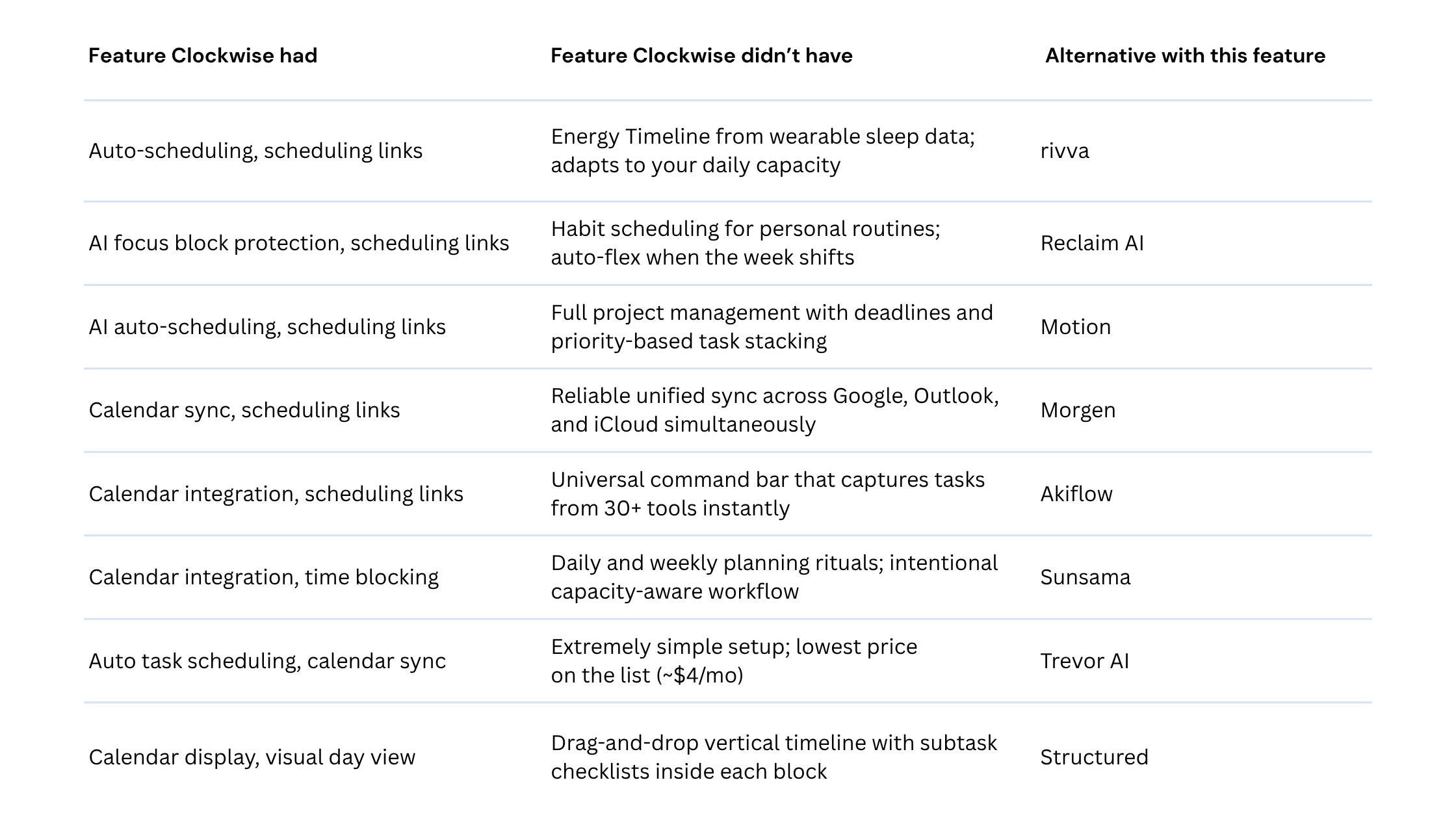
Quick comparison table:
The 8 best Clockwise alternatives
1. rivva
rivva is an AI daily planner built around one idea: your capacity changes every day, and your schedule should change with it. Nia, the AI assistant, connects to your wearables — Apple Watch, Fitbit, Oura, Whoop — reads your sleep data, and builds a daily Energy Timeline that shows you when you’re likely to be sharp versus when you’ll be running on fumes. Your hardest tasks get placed during peaks. Recovery periods get lighter work or nothing at all.
Best for: People with fluctuating energy — neurodivergent folks, people managing chronic fatigue or irregular sleep, or anyone who’s noticed that their Tuesday-morning brain and their Thursday-afternoon brain are basically different people.
Key features:
Energy Timeline: a visual daily arc built from sleep and wearable data, showing cognitive peaks and dips
Smart Scheduling: Nia automatically places tasks in your calendar based on both duration and your current energy forecast
Nia AI assistant: accessible via text or voice, answers scheduling questions, adjusts your day when things go sideways
Scheduling Links: shareable booking links that only show windows that don’t conflict with your energy blocks
Multi-calendar support: Google, Outlook, and iCloud in sync, plus a unified Tasks view
Pricing: Free tier available. $10/month or $80 per year for premium with a 7-day free trial. Available on iOS, Android, and web.
Pros:
The only scheduling tool that actively uses wearable data to drive task placement
Nia genuinely adapts when your day changes; if you tell her you’re exhausted, she reschedules accordingly
Clean, calm interface that doesn’t add to the overwhelm it’s trying to solve
Voice access means you don’t have to open an app to rearrange your afternoon
Cons:
Wearable integration is the main differentiator, so if you don’t wear one, you lose some of the magic
Newer product — the ecosystem and integrations are still growing
No team coordination features; this is a personal planning tool
2. Reclaim AI
Reclaim is probably the most direct functional replacement for what Clockwise did for individuals. It connects to Google Calendar and automatically schedules habits, focus blocks, and flexible tasks around your fixed commitments.
Best for: Google Workspace users who want Clockwise-style auto-scheduling with solid habit protection and a generous free tier.
Pricing: Free tier available. Paid plans start around $8/month.
3. Motion
Motion is the heavy-duty auto-scheduler. It takes your entire task list, figures out deadlines and priorities, and builds a full schedule for you automatically every morning.
Best for: Freelancers, founders, and project managers juggling a high volume of time-sensitive tasks.
Pricing: $19–34/month. 7-day free trial.
4. Morgen
Morgen takes a clean, integration-first approach: it combines your calendars and tasks in one unified view, syncs beautifully across Google, Outlook, and iCloud.
Best for: People who primarily need a better multi-calendar interface with light AI scheduling features.
Pricing: Free tier available. Pro plan around $9/month.
5. Akiflow
Akiflow is a command-bar-first task and calendar tool built for people who live on their keyboard.
Best for: Power users and developers who want frictionless keyboard-driven planning.
Pricing: Around $19/month.
6. Sunsama
Sunsama is a daily planning tool built around intentionality — a guided morning ritual where you pull tasks, estimate time, and build a realistic day.
Best for: People who feel overwhelmed by over-automated systems and want a calmer daily planning practice.
Pricing: Around $20/month. 14-day free trial.
7. Trevor AI
Trevor AI is the simplest entry on this list. You connect your task list and calendar, and Trevor schedules tasks automatically in open slots.
Best for: Beginners, students, or anyone who wants basic AI task scheduling without complex setup.
Pricing: Free tier available. Paid plan around $4/month.
8. Structured
Structured is a visual timeline planner with an emphasis on aesthetics and tactile simplicity. Each task sits on a clean vertical timeline.
Best for: Visual thinkers, students, and anyone who wants a clean iPad-friendly daily timeline.
Pricing: Free tier available. Structured Pro around $3/month.
FAQ
Q: Is there a free Clockwise alternative?
Yes — several. rivva, Reclaim AI, Morgen, Trevor AI, and Structured all have genuinely useful free tiers. rivva offers a 7-day free trial for pro features.
Q: Which Clockwise alternative works best with Outlook and Microsoft 365?
Morgen and Akiflow both support Outlook calendar natively. Motion also supports Outlook. Reclaim AI is primarily Google Calendar.
Q: What’s the difference between rivva and the other AI schedulers?
Most AI schedulers know about your time. rivva knows about your energy. By connecting to wearables, it sees how you slept, models your cognitive peaks and dips, and uses that to decide when to schedule your hardest work.
Bottom line
Clockwise closing left a real gap. If you needed focus time protection, Reclaim comes closest. If you needed full auto-scheduling, Motion is the most powerful. And if you’re ready to move past what Clockwise could do — into scheduling you according to how you actually function — rivva is where that conversation starts.