
7 Best Time Blocking Apps That Actually Adapt
Most time blocking apps assume your day goes to plan. The best ones adapt when it doesn't. Here's what actually works.

Time blocking is one of those productivity ideas that sounds perfect in theory. You carve your day into dedicated chunks and follow the plan. Then reality shows up. A meeting runs long. You slept badly. A client fires off an urgent request at 10:15.
This is the failure mode of most time blocking apps: they’re excellent at helping you make a plan but useless at helping you hold one. The better question isn’t “which app has the nicest calendar UI?” — it’s “which app actually helps when things stop going to plan?”
What separates time blocking apps that adapt from ones that don’t
1. It accounts for your energy, not just your clock — Scheduling a cognitively demanding task at 3pm on a Friday is wrong before you started.
2. It reschedules automatically, not manually — Apps that automatically rebalance your remaining day after a disruption save you replanning overhead.
3. It protects focus time rather than just displaying it — There’s a difference between blocking time and defending it.
4. It handles tasks and events together — The best time blocking tools bring tasks into the calendar so you can see total capacity against total demand.
5. It doesn’t require constant manual upkeep — Low-friction daily resets and auto-scheduling mean the plan stays current.
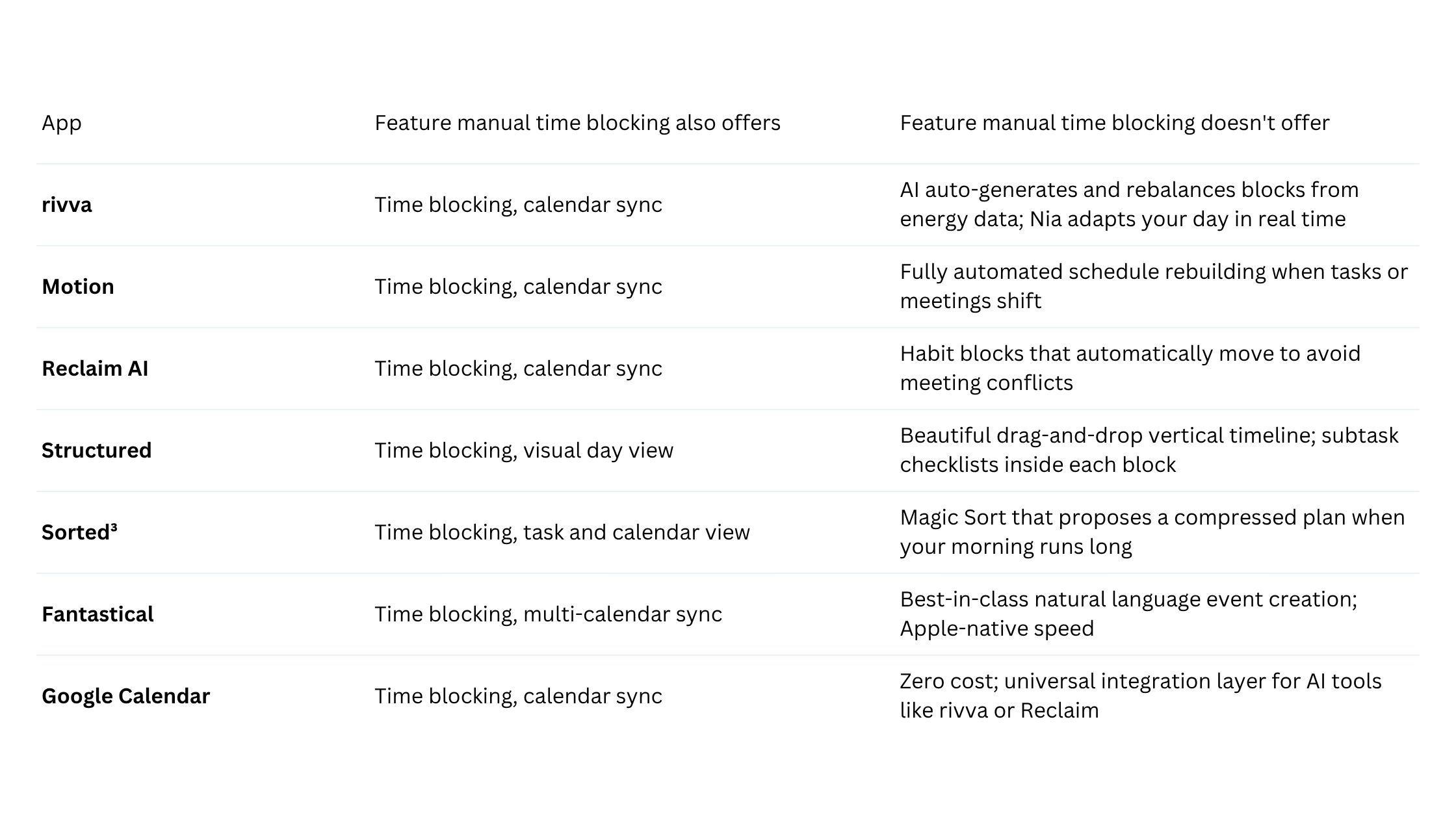
Quick comparison table:
The 7 best time blocking apps
1. rivva
rivva is an AI daily planner built around the idea that your capacity fluctuates. It auto-schedules blocks based on your energy forecast drawn from sleep and wearable data, and rebalances your day automatically when things shift.
Best for: Knowledge workers and ADHD planners who find rigid schedules collapse because they ignore how energy moves through a day.
How it handles changes: When a block gets moved or a new task drops in, rivva rebalances remaining blocks around your updated energy forecast — the rest of your day adjusts to match what you can realistically do.
Key features:
Energy Timeline maps cognitive peaks and dips from sleep and wearable data
Smart Scheduling auto-generates time blocks from your task list based on available capacity
Nia AI assistant accessible by text and voice for rescheduling and daily planning
Multi-calendar sync across Google, Outlook, and Apple Calendar
Pricing: 7-day free trial, then $10/month or $80 per year.
2. Motion
Motion is an AI auto-scheduler that builds your entire day from scratch every morning based on deadlines, priorities, and meeting gaps.
Best for: People managing high task volume across multiple projects who want their day fully auto-generated.
How it handles changes: Add a task, change a deadline, accept a meeting invite — Motion rebuilds the day around the new reality.
Pricing: $19–$34/month.
3. Reclaim AI
Reclaim AI integrates with Google Calendar and uses AI to create and defend recurring habit blocks, focus sessions, and scheduling links.
Best for: People on Google Calendar who want AI-protected deep work windows.
How it handles changes: Reclaim automatically reschedules habits and focus blocks when meetings encroach.
Pricing: Free tier available. Paid plans from approximately $8/month.
4. Structured
Structured is a visual daily timeline app for iOS that brings beautiful tactile clarity to manual time blocking.
Best for: People who prefer manual control but want a cleaner interface than Google Calendar.
How it handles changes: Manual — you move blocks yourself. But the interface makes this fast and frictionless.
Pricing: Free tier available. Pro plan approximately $3/month.
5. Sorted³
Sorted³ is a hyper-scheduling app for iOS that pulls from your Apple Reminders and calendar and lets you drag tasks directly onto a timeline.
Best for: iOS-native users who want to see all tasks and events on one timeline.
How it handles changes: The Magic Sort feature can reorder remaining tasks to fit available time when the morning runs long.
Pricing: Approximately $5 as a one-time purchase.
6. Fantastical
Fantastical is a polished calendar and task app known for natural language event creation. You type “deep work Tuesday 9am to 11am” and it creates the block.
Best for: People who want a premium calendar experience for manual time blocking on Apple devices.
Pricing: Free tier available. Flexibits Premium approximately $5/month.
7. Google Calendar
Google Calendar is free, universal, and already embedded in most people’s workflows. For time blocking, you create colored blocks, assign them durations, and look at your day.
Best for: People who want to start experimenting with time blocking without adding new software.
Pricing: Free.
Time blocking vs AI scheduling: when to use which
Manual time blocking works well when your days are predictable and your schedule is relatively stable. AI scheduling makes sense when the manual overhead is itself becoming a productivity problem.
There’s also a middle ground: using Google Calendar or Fantastical as the display layer while feeding it AI-generated schedules from rivva or Reclaim.
FAQ
What is time blocking and does it actually work?
Time blocking means assigning specific time windows to specific types of work rather than moving through your day reactively. The research backing is solid — structured time allocation reduces task-switching overhead. Rigid systems fail when days get disrupted. More adaptive approaches tend to be more durable.
What makes a time blocking app better than just using Google Calendar?
Google Calendar shows you time. A time blocking app helps you manage capacity — through task integration, conflict handling, and energy awareness.
Can time blocking help with ADHD?
It can, with the right approach. The structure of assigned time windows reduces decision overhead. Energy-aware scheduling that builds in flexibility tends to be more compatible with variable-attention days.
Bottom line
Most time blocking apps solve the wrong problem. They make it easy to create a schedule while offering nothing when that schedule meets reality.
If you want the most adaptive option, rivva’s energy-aware AI scheduling is the one to try — the only tool here that accounts for your cognitive state when generating blocks, not just your available time.