
7 AI Calendar Apps That Actually Learn How You Work
Not all AI calendar apps are equal. These ones adapt to your working style, not the other way around.

Plenty of calendar apps have added “AI” to their feature list in the last two years. Most of them mean something specific and limited by that: a natural language parser that turns “lunch with Maya Friday” into a calendar event, or a scheduling assistant that finds a free slot when someone wants to book a meeting. These are useful features. But they’re not learning. They’re executing rules you’ve already set, or following patterns that are obvious to any competent algorithm.
True learning in a calendar app means something harder: the tool observes how you actually work — what you protect, what you skip, when your focus is highest, how your habits drift under pressure — and changes its behaviour accordingly, without you having to go in and update settings every time life shifts.
The seven tools here vary significantly in what they learn and how they use it. Some read your physiological state from wearables. Some track which tasks you consistently move or cancel and draw conclusions from that. Some observe your calendar patterns over weeks and start anticipating what you’ll need.
What separates learning AI calendars from rule-following ones?
The test is simple: does the tool change its behaviour based on what it observes, or does it only do what you explicitly told it to do?
A rule-based tool protects Tuesday mornings for deep work because you created a recurring block. It doesn’t know that you’ve been skipping that block for three weeks, or that your recovery scores have been low.
A genuinely adaptive tool notices those patterns. It might soften its defence of Tuesday mornings because you’ve overridden it consistently. It might shift your writing blocks later in the day if that’s when you’re actually completing them.
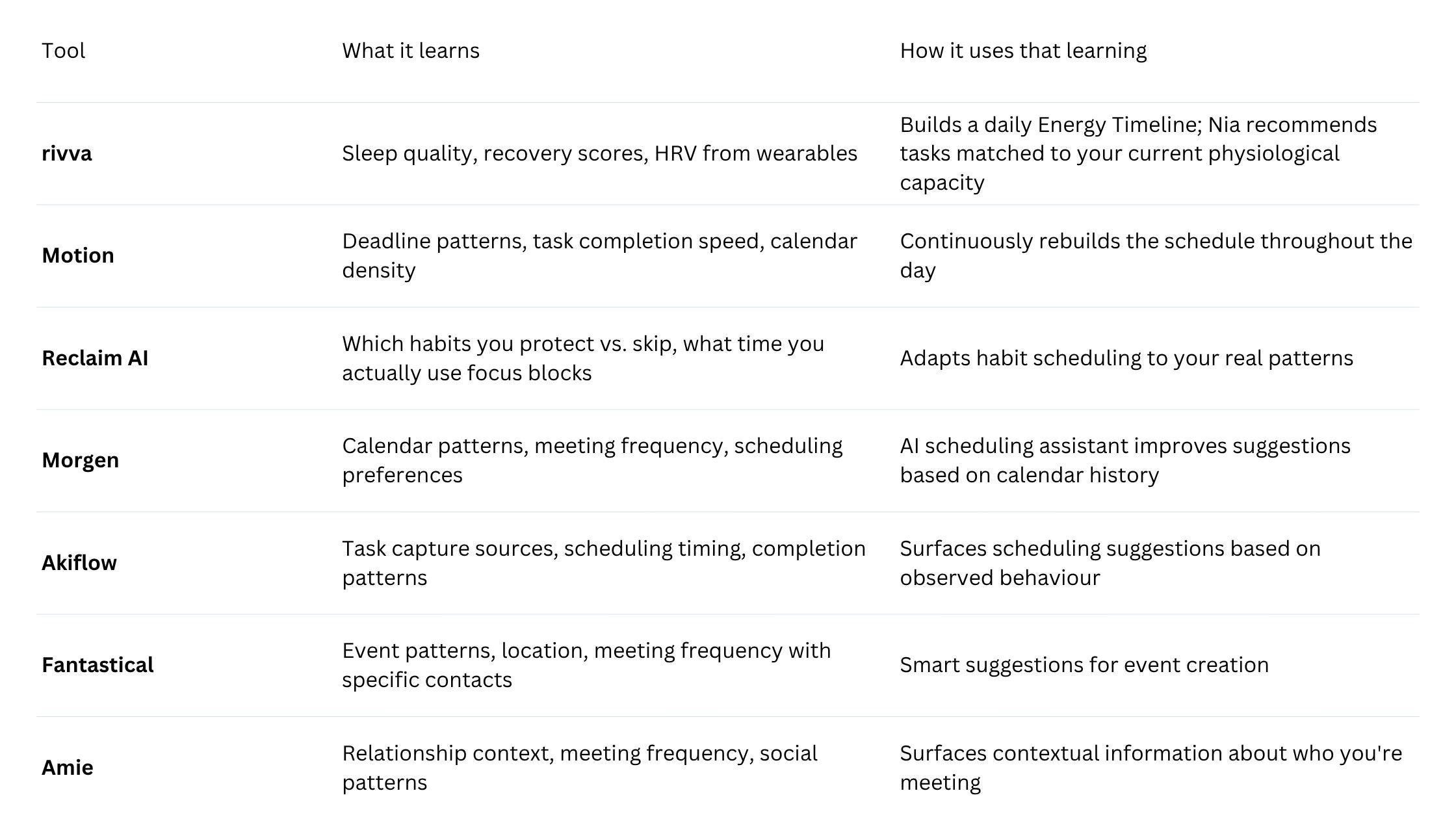
Quick comparison
1. rivva
Best for: People whose capacity genuinely fluctuates from day to day due to sleep, illness, high-stress periods, or variable workloads.
rivva starts with a question that most calendar apps never ask: how are you, physiologically, right now? It connects to wearables — Apple Watch, Fitbit, Oura Ring, Whoop — and reads sleep duration, sleep quality, recovery scores, and HRV. From that data, it builds an Energy Timeline each morning: a visual map of your day that shows when your cognitive peaks are expected and when your capacity will likely dip.
The learning isn’t just about averages. rivva tracks how your recovery data correlates with your actual behaviour over time and refines its timeline accordingly. On a morning after poor sleep, the Energy Timeline looks different than it does after a well-recovered night.
Nia, rivva’s AI assistant, operates in both text and voice. She sits on top of the Energy Timeline and makes recommendations in real time: given your current state, what should you do next?
What rivva learns that others don’t: your physiological recovery state, not just your schedule patterns.
Pricing: Free tier available. $10/month or $80 per year for premium with a 7-day free trial. Available on iOS, Android, and web.
Pros:
Only tool here that reads physiological data from wearables
Energy Timeline makes abstract energy levels into something actionable
Nia removes the “what do I do now” decision at low-capacity moments
Adapts daily, not just over long learning periods
Cons:
Full functionality requires a compatible wearable
Works best with consistent wearable use
2. Motion
Best for: People with dense schedules and many competing deadlines.
Motion learns primarily through observation of how plans diverge from reality. It watches what you said you’d do and what you actually did. The distinguishing feature is continuous rescheduling — Motion doesn’t just plan your day in the morning and leave it alone. It recalculates throughout the day.
Pricing: Individual plans from $19/month.
3. Reclaim AI
Best for: People trying to build consistent habits and protect deep work time.
Reclaim learns what you actually protect. It knows the difference between a habit block you keep and one you consistently skip or shorten. The adaptation happens gradually and silently.
Pricing: Free tier available. Pro from $10/month.
4. Morgen
Best for: People who want an AI scheduling assistant that understands their calendar context.
Morgen’s AI scheduling assistant observes which time slots you tend to choose for different types of work, how your meeting patterns shift across the week, and what kinds of events you accept or decline.
Pricing: Free tier. Pro from $9/month.
5. Akiflow
Best for: People who capture tasks from many different sources.
Akiflow’s learning is focused on workflow patterns rather than calendar patterns. It observes which integrations you use most, when you tend to schedule different types of tasks.
Pricing: From $15/month.
6. Fantastical
Best for: People who want a polished, native calendar experience on Apple devices.
Fantastical’s smart suggestions during event creation are genuinely time-saving: it learns which people you frequently meet with, what locations you use, and how long different types of events tend to run.
Pricing: Fantastical Premium from $4.75/month.
7. Amie
Best for: People who manage many relationships and want their calendar to reflect relational context.
Amie takes a relationship-first approach to calendar learning. It tracks how often you meet with specific people and the context around those meetings.
Pricing: Free tier. Pro pricing available.
How to choose
If your capacity fluctuates and you want the calendar to know that: rivva is the only tool that reads physiological data.
If you have many deadlines and need continuous adaptation: Motion’s real-time rescheduling.
If you’re trying to protect habits and focus time: Reclaim AI’s observational learning.
If you primarily work on Apple devices: Fantastical’s event-creation learning.
If your work is relationship-dense: Amie’s social-context learning.
Bottom line
The gap between “AI calendar” and “calendar with AI-branded features” is significant. The seven apps here each learn in a meaningful way — but what they learn varies considerably. For people whose schedules are disrupted by fluctuating energy and recovery, rivva’s wearable-based learning addresses the root cause rather than just the symptoms.