
10 Best AI Task Managers for When You're Overwhelmed
The best AI task manager doesn't just organise your list. It tells you what to do next when your brain can't figure it out.

You open your task manager. There are 47 items staring back at you. Some have due dates. Some don’t. A few are flagged urgent. Others have been sitting there so long they’ve become part of the furniture. You scroll through the list once, then again. Nothing clicks. You close the app and check email instead.
This isn’t a productivity failure. It’s a design failure. Traditional task managers were built to store information, not to help you act on it. They record everything you need to do and then leave you alone in a room with all of it. When your mental bandwidth is low — when you’re tired, scattered, or simply carrying too much — a list of 47 items doesn’t narrow anything down. It makes things worse.
The tools in this guide approach that problem differently. Some remove the decision entirely and auto-schedule everything. Some build rituals around the moment you sit down to plan. Some read your actual physiological state and make recommendations based on how much capacity you genuinely have right now.
What makes an AI task manager worth using?
At the shallow end, AI means natural language input. In the middle, AI means auto-scheduling. At the deeper end, AI means adaptive prioritisation: the tool considers not just what is due and when you’re free, but whether you’re in a state to actually do it. That last layer is where the real value lives for people who struggle with overwhelm.
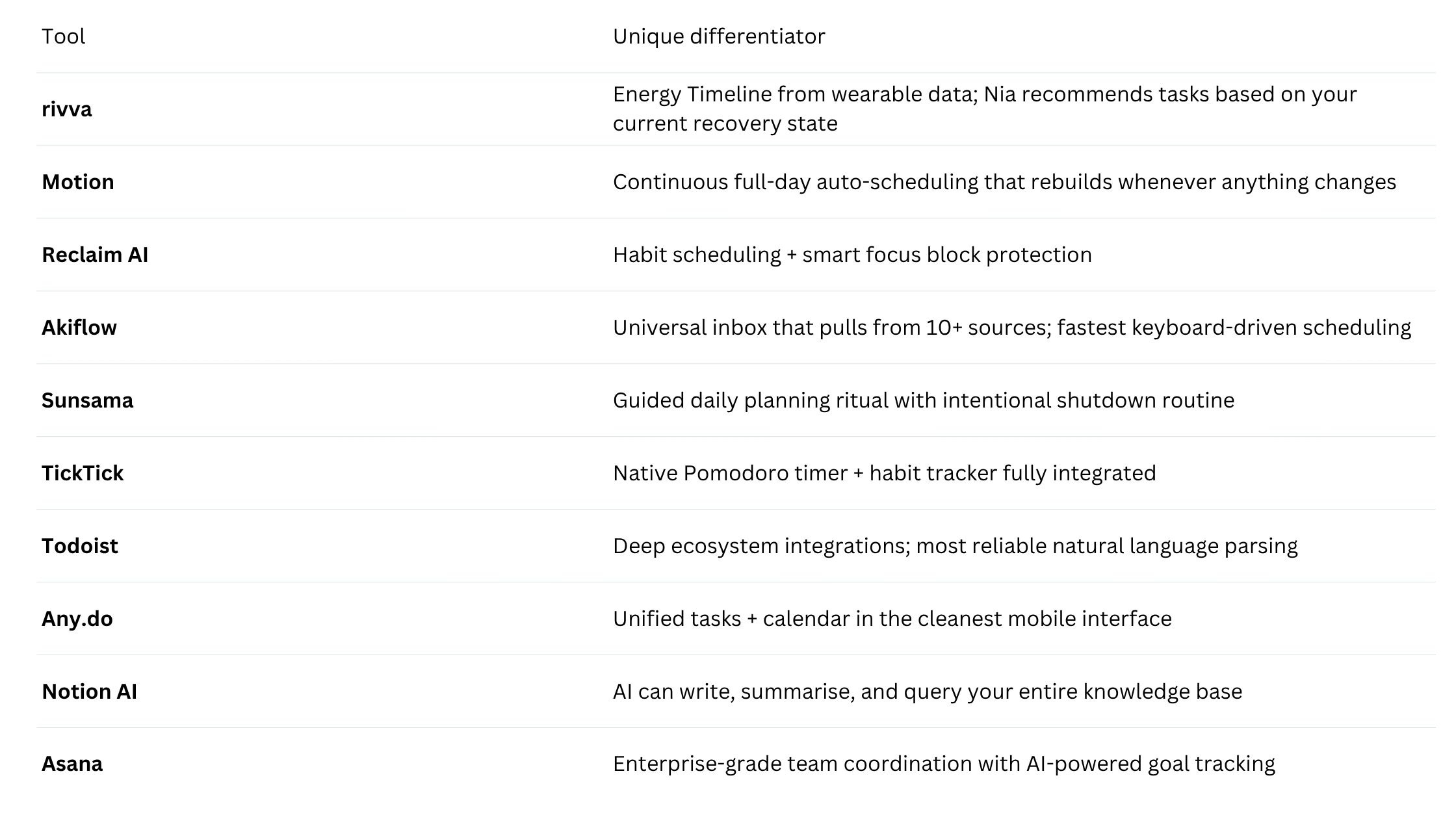
Quick comparison
1. rivva
Best for: People whose energy and capacity fluctuate day to day.
rivva connects to your wearables — Apple Watch, Fitbit, Oura Ring, Whoop — and reads your sleep and recovery data overnight. By the time you open the app in the morning, it has built an Energy Timeline: a visual map of your day showing when your cognitive peaks are likely to arrive and when your capacity will dip. Hard, focused work gets placed into peak windows. Administrative tasks get moved to the dips.
Nia, rivva’s AI assistant, works in text and voice. When you can’t figure out what to do next — that moment of overwhelm at 2pm when your focus has slipped — you ask Nia. She looks at your energy state, your remaining tasks, and your available time, and tells you what makes sense right now.
Key features: Energy Timeline from wearables, Nia AI assistant (text + voice), Smart Scheduling, multi-calendar sync, Scheduling Links, iOS, Android, web.
Pricing: Free tier available. $10/month or $80 per year for premium with a 7-day free trial. Available on iOS, Android, and web.
Pros:
The only tool here that reads your physiological recovery state
Nia removes the decision-making burden at your lowest-capacity moments
Energy Timeline makes abstract “I’m tired” feelings into something you can plan around
Cons:
Requires a compatible wearable for the full energy layer
Newer product
2. Motion
Best for: People who want their entire day auto-scheduled without having to think about it.
Motion’s core proposition: give it your tasks, your deadlines, and your calendar, and it will build your schedule. Every morning it generates a full day plan. When something runs over or a new urgent task comes in, Motion reschedules everything in real time.
Pricing: Starts at $19/month individual.
3. Reclaim AI
Best for: People who want to protect deep work time and build consistent habits.
Reclaim sits between your task manager and your calendar. Its defining feature is intelligent focus block protection — it schedules your tasks into available time, but also learns what you habitually protect and defends those slots against meeting pressure.
Pricing: Free tier available. Pro from $10/month.
4. Akiflow
Best for: People who manage tasks coming in from many different sources.
Akiflow is built around the universal inbox concept: it pulls tasks from Gmail, Slack, Asana, Notion, Linear, Todoist, and around a dozen other tools into a single place.
Pricing: Starts at $15/month.
5. Sunsama
Best for: People who want a structured daily planning practice and intentional start and end to each workday.
Sunsama is the most deliberately paced tool on this list. Each morning it guides you through a planning ritual. Each evening there’s a shutdown routine that clears the slate.
Pricing: $20/month.
6. TickTick
Best for: People who want reliable task management with built-in focus and habit features, without paying a lot.
TickTick has been quietly one of the most complete task managers available for years. Native Pomodoro timer. Habit tracker. Calendar view. Natural language input.
Pricing: Free tier available. Premium at $35.99/year (~$3/month).
7. Todoist
Best for: People who want a trusted, reliable task manager with excellent natural language input and broad integrations.
Todoist is the closest thing to a gold standard in traditional task management. It works on every platform, integrates with almost everything, and has earned a reputation for never losing your data.
Pricing: Free tier. Pro at $5/month.
8. Any.do
Best for: People who want the simplest possible unified tasks-and-calendar experience, especially on mobile.
Any.do has been refining its clean, minimal approach for over a decade. Tasks and calendar live together. Any.do AI helps with planning suggestions.
Pricing: Free tier. Premium at $5.99/month.
9. Notion AI
Best for: People who already use Notion as their primary workspace.
Notion AI brings a different kind of intelligence — less scheduling and more cognitive support. It can summarise a long project doc, generate tasks from a meeting note, answer questions about your workspace.
Pricing: AI add-on at $10/member/month.
10. Asana
Best for: Teams who need coordinated project management with AI features for workload visibility.
Asana is the most team-oriented tool on this list. Its AI features focus on helping managers see where work is blocked, predicting project health, and summarising status updates.
Pricing: Free tier (limited). Premium from $10.99/user/month.
How to choose
If your overwhelm is about not knowing what to do next given how you’re feeling: rivva’s energy-aware approach is the most direct solution.
If your overwhelm is about too many competing deadlines: Motion’s auto-scheduling is built for that.
If your overwhelm is about never protecting time for focused work: Reclaim AI’s focus block protection.
If your overwhelm is about tasks coming in from too many places: Akiflow’s universal inbox.
If your overwhelm is about never feeling like you’ve properly started the day: Sunsama’s planning ritual.
Bottom line
A task manager that shows you 47 items and leaves you to figure it out hasn’t solved the problem — it’s just moved it. The right answer depends on where your particular version of overwhelm lives. For people whose capacity genuinely fluctuates from day to day, rivva’s energy layer offers something the rest of the category doesn’t: a schedule that reflects not just what’s due, but what you’re actually ready for.